Build a software factory with Claude Code
Tares runs a crew of Claude Code sessions (an orchestrator, a reviewer and builders) in the
background on your machine. You sign in with tares login (or run Tares yourself with tares up),
start the crew with tares factory crew up, and plan a project with /tares:spec (or tares factory spec). The crew builds the tickets into pull requests merged on main.
What is a software factory?
A software factory is a crew of AI coding agents that builds software the way a small team does. You agree on a plan, someone hands out the work, builders open pull requests, a reviewer holds every change to a fixed bar, and nothing merges until it passes. The difference is that every member of the crew is a Claude Code session running in the background on your machine.
In Tares, the crew is:
- orchestrator: hands out work, answers the others, and brings you what needs you. It is the only session you talk to.
- reviewer: reviews every pull request to a fixed bar and posts its verdict on the pull request.
- builders: one per milestone and repo of a project, started by the orchestrator. Each takes a ticket, works on its own branch, opens a pull request, and merges it once the reviewer passes it and CI is green.
- releaser: only if you ask for one. It tags and deploys. Without it, tickets end at merged on main.
Tares is the crew’s backbone. It holds the plan, the tickets and their stages, every review, the assumptions the crew made, the questions it asked you, and your answers in your own words. The sessions come and go; the record stays on Tares, so a crew that restarts carries on where it stopped.
One crew, many projects
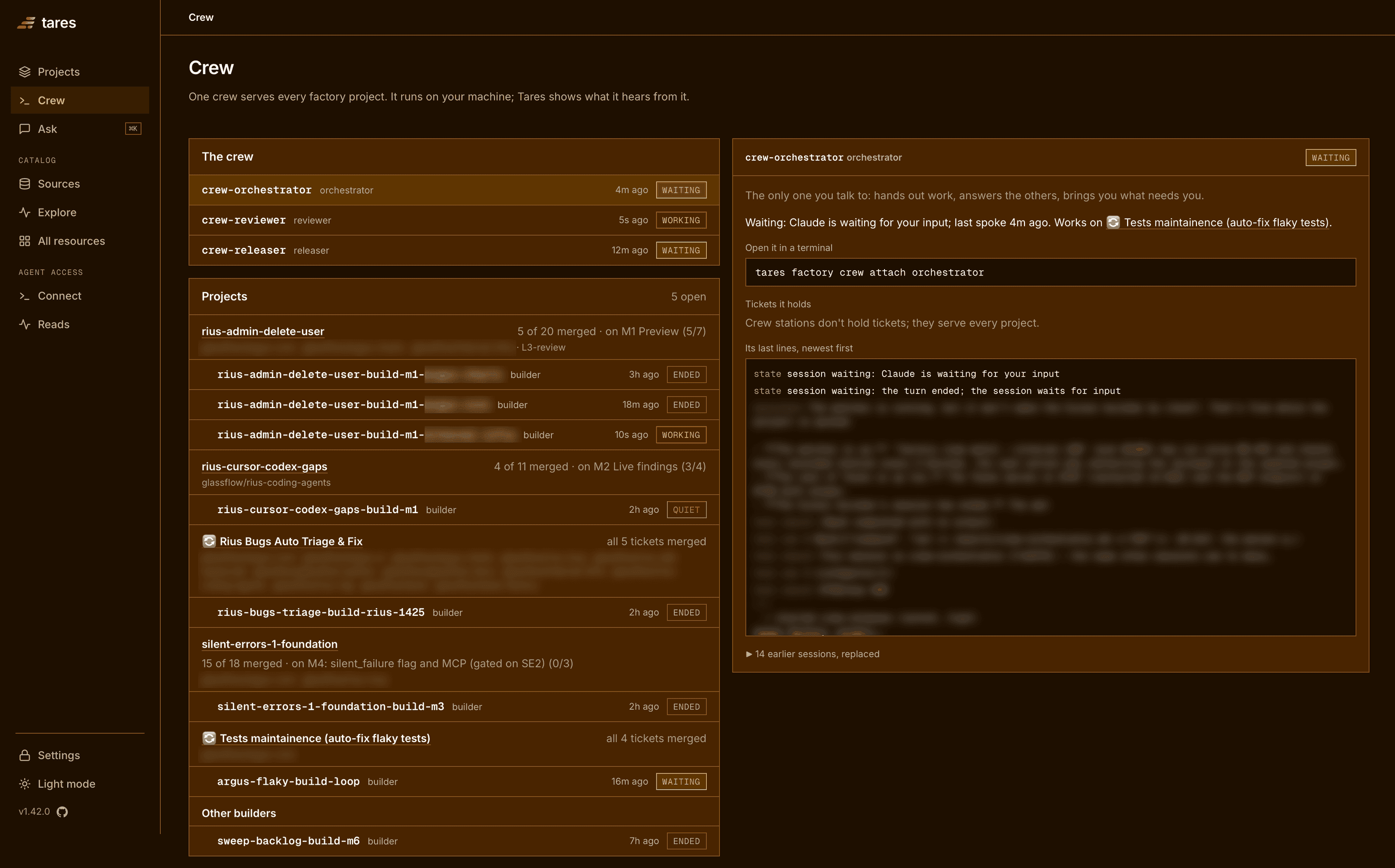
Bring the crew up once, then hand it as many projects as you like. It works on all of them at the same time: the orchestrator starts builders for each project, one per milestone and repo, up to the number you allow, and the reviewer reviews every pull request. While one project waits for you, the others carry on.
You talk to one session, the orchestrator. Questions from every project reach you there, one at a time, and the Crew page shows each project’s progress and builders. A single project can also wait for your yes before every merge, even when the rest of the crew merges on its own.
The goal
Hand over a project and get it back merged, with you pulled in only for decisions that are really yours. You spend your time on the plan and on the few questions the crew cannot answer itself, not on watching terminals. Every choice the crew made on its own is written down, so you can check it at the end of each milestone instead of during every step.
Who it is for
Right now, the software factory is for solo developers and very small teams who already work with Claude Code and want it to take a whole project, several pull requests long, from plan to merged without being driven one prompt at a time. It runs on one machine, on your own Claude Code login, against your own GitHub repos.
Quickstart
The one command to remember is tares factory crew up. It starts the crew, and the crew then
serves every project you hand it.
Check what you need
- Claude Code, signed in, on a plan that allows background sessions. The stations use your Claude Code login; there is no separate model API key.
gh, signed in (gh auth login), with write access to the repos the crew works in.git,jqandcurl.- Optional: the Codex CLI, if you want a second model to check every commit.
Install the CLI and point it at Tares
The crew always runs on your machine, as Claude Code sessions. Tares, which keeps the plan, the tickets, the reviews and your answers, can run next to it or on Tares Cloud.
Local
uv tool install tares     # or: brew install glassflow/tap/tares
tares up                  # console on http://127.0.0.1:8787
In a second terminal, start the MCP endpoint every crew session shares:
tares mcp --transport streamable-http # http://127.0.0.1:8788/mcpWith auth on, start it with TARES_AUTH_TOKEN set to your token. Stations reach Tares only
through this endpoint, so crew up and spec stop and tell you when it does not answer.
Leave tares up and tares mcp running, and use a third terminal for the steps below.
The tares package includes the Tares plugin the crew uses, so there is nothing to install in
Claude Code.
If the Tares plugin is also installed from the marketplace (tares@tares) at a different version,
Claude Code loads that one instead and the stations run without their factory skills. Update it
to the plugin version your tares package ships, or remove it with claude plugin uninstall tares@tares.
tares factory doctor tells you when the two differ.
Give Tares access to GitHub
Builders push and open pull requests with your gh login. Tares reads the pull request, CI and
merge state of every ticket itself, so it needs its own access to the repos:
- Tares Cloud: in your workspace settings, choose Connect GitHub and pick the repos.
- Local: add a GitHub token or App under Settings > GitHub.
See GitHub for both.
Bring up the crew
tares factory crew upThe crew lives in a folder of its own, ~/factory. The first run offers to open Claude Code there
so you can trust the folder once, then asks how far the crew may go: whether it merges on its own
after review and green CI (recommended) or waits for your yes, whether it releases, whether a
second model checks every commit, how many builders run at once, and anything you always allow.
The answers are kept on Tares.
crew up also starts a watch in the background that brings back any station that stops.
Plan a project
In the repo the project builds on, or a folder that holds its repos:
tares factory spec "what you want to build"This opens Claude Code with /tares:spec. It interviews you one question at a time, has a second
model attack the plan, and writes it into a Tares project: the spec, milestones with acceptance
checks, tickets with a working doc each, and an AGENTS.md. It ends by asking whether to hand the
project to the crew. Say yes, and the orchestrator picks it up.
Answer the crew’s questions
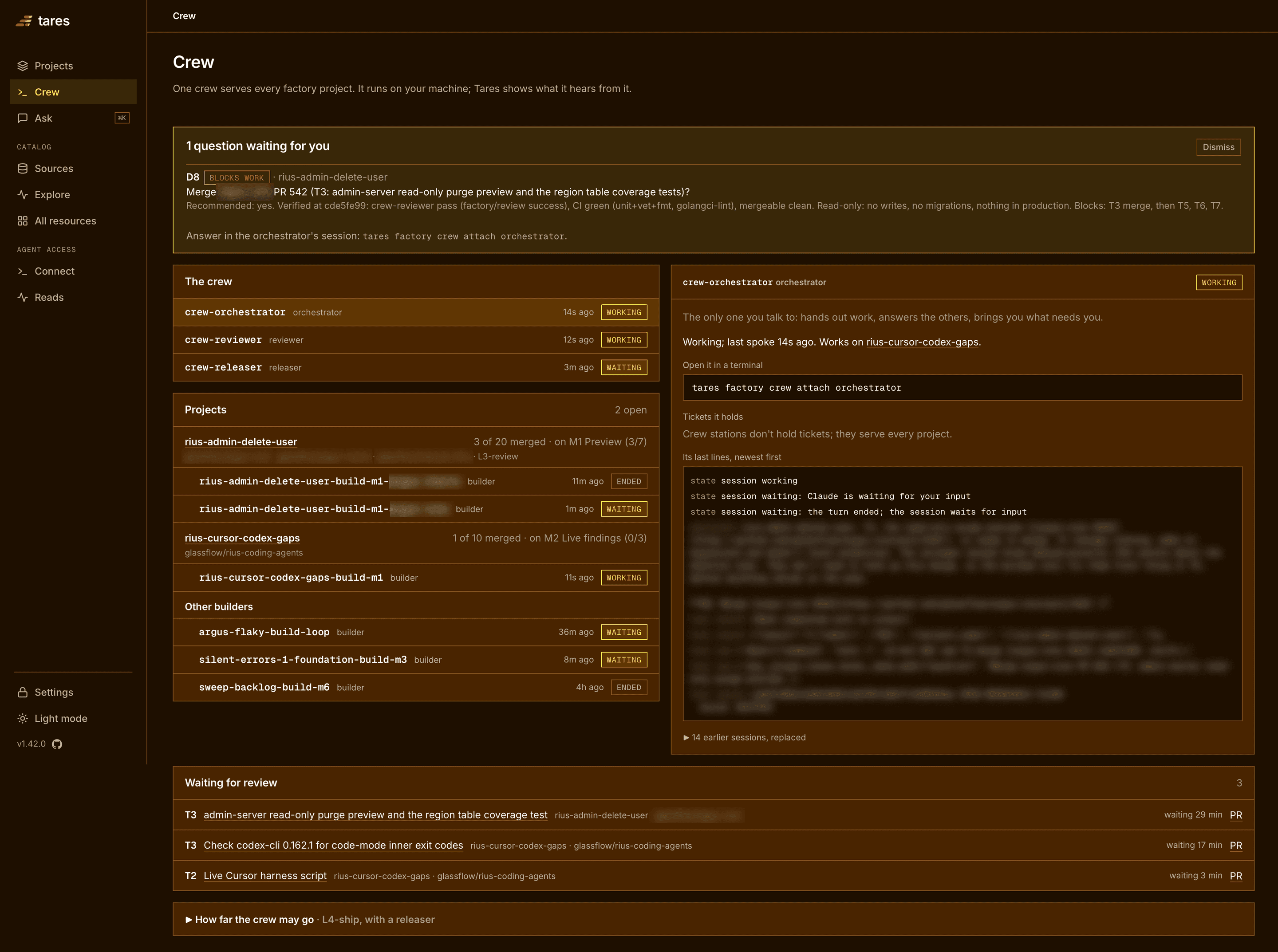
tares factory crew attach orchestratorQuestions reach you in the orchestrator’s session, one at a time, each with a recommendation. Follow progress on the Crew page of the Tares console (http://127.0.0.1:8787/crew locally). It shows the question waiting for you at the top, then the stations, each open project with its builders, and the pull requests waiting for review.
Run tares factory doctor at any point to check everything the crew needs.
Build a project in one session
Not every project needs a crew. Work on one in your own Claude Code session instead, still on Tares: your shared AGENTS.md and memory apply, and the session’s record lands on the project.
tares factory session "<idea>"      # plan a small project and build it right there
tares factory session <project>     # work on a planned project
tares factory session               # pick one, or start something new
Each opens Claude Code with the Tares plugin, bound to the project. A plain claude has no Tares
tools, so start sessions that work on a project this way.
- A new idea: a few questions, a short spec and a ticket list on Tares, then the session builds it. If the plan turns out big, it offers the full spec and the hand-over to the crew instead.
- A planned project: the session reads its starting prompt and works the ready tickets.
- A project the crew has: it asks whether to take it over. Say yes and the crew stops: its builders push what they have and write their progress, and the session carries on from their branches and pull requests. Say no and the crew keeps it.
Commands
| Command | What it does |
|---|---|
tares factory crew up | Start the crew and the watch. The first run asks the crew settings. |
tares factory spec "<idea>" | Plan a project with Claude Code and hand it to the crew. |
tares factory session [<project> | "<idea>"] | Work on a project in your own Claude Code session, or plan a small one and build it there. Takes a project over from the crew when you say yes. |
tares factory crew attach orchestrator | Open the orchestrator in this terminal to answer its questions. |
tares factory crew status | The stations, the questions for you, and a line per project. |
tares factory crew desk | The questions waiting for you, each in full. |
tares factory projects | Every project handed to the crew, its progress, builders and repos. |
tares factory crew logs <station> | A station’s recent output. |
tares factory finish <project> "<words>" | Mark a project done yourself. |
tares factory crew halt "<reason>" | Stop merges, pushes and new sessions until crew resume. |
tares factory crew down | Stop every station. Tares keeps the projects, tickets and answers. |
tares factory doctor | Check everything the crew needs. |
tares factory finds its Tares in this order: TARESD_URL and TARES_AUTH_TOKEN when set, then
the workspace tares login saved, then the local Tares at http://127.0.0.1:8787. tares factory doctor says which one it used. Its sessions reach the MCP endpoint at http://127.0.0.1:8788/mcp
for a local Tares, or at the workspace’s address plus /mcp for a remote one; set
TARES_FACTORY_MCP_URL if yours runs elsewhere.
Next
A real project the crew took from spec to merged: the crew, the tickets, the reviews and the five questions it asked.
A project, end to endHow the sessions keep running while you are away, how work gets picked up and what still needs you.
Run autonomous, self-running Claude Code sessionsHow a Tares crew compares with subagents, agent teams, OpenHands, Devin and hand-run worktrees.
Software factory for Claude Code compared