Advanced features
Volume and privacy controls for production deployments of the Rius
SDK: head sampling to reduce trace volume, and two independent controls over
what content leaves your process. All of them are init() arguments; none
require code changes in your agent.
Sampling
By default the SDK exports every trace. To reduce volume, set a head-sampling rate:
Python
rius.init(sample_rate=0.25) # keep ~25% of tracesor via the environment:
export RIUS_SAMPLE_RATE=0.25How it samples
The SDK installs a ParentBased(TraceIdRatioBased(rate)) sampler:
- Whole traces, not individual spans. The decision is made once per trace, from the trace ID, at the root span. Every child span follows the root’s decision, so you never get fragments of a trace.
- Parent decisions are respected. If a span arrives with tracing context from an upstream service or another instrumentation layer, its sampled flag is inherited rather than re-rolled. The rate only governs traces that start inside your process.
- Head sampling only. The decision happens at trace start; there is no tail sampling based on errors or latency in the SDK.
Values outside [0.0, 1.0] are clamped, with a warning log. 0.0 drops
everything; 1.0 (the default) keeps everything.
When to sample
Sampling trades visibility for volume. Two rules of thumb:
- Keep
1.0in development and staging; you want every trace while iterating. - In high-traffic production, prefer lowering the rate over disabling tracing: a 10% sample still shows latency and cost distributions, and error spans in sampled traces remain fully detailed.
If you need to drop content but keep every trace, use the privacy controls below instead of sampling.
Privacy controls
The SDK has two independent controls over what content leaves your process: a switch that strips content entirely, and a masking hook that transforms it. Both run at export time, inside your process, before anything is sent.
capture_content: the content switch
Python
rius.init(capture_content=False)
# or: export RIUS_CAPTURE_CONTENT=falseThe default is True (content is captured). With False, prompt and
response content is stripped from spans at export while metadata still
flows: model names, token counts, span taxonomy, finish reasons, latencies.
You keep cost and performance analytics and give up content-level debugging.
The same span in the console, with the switch in each position:
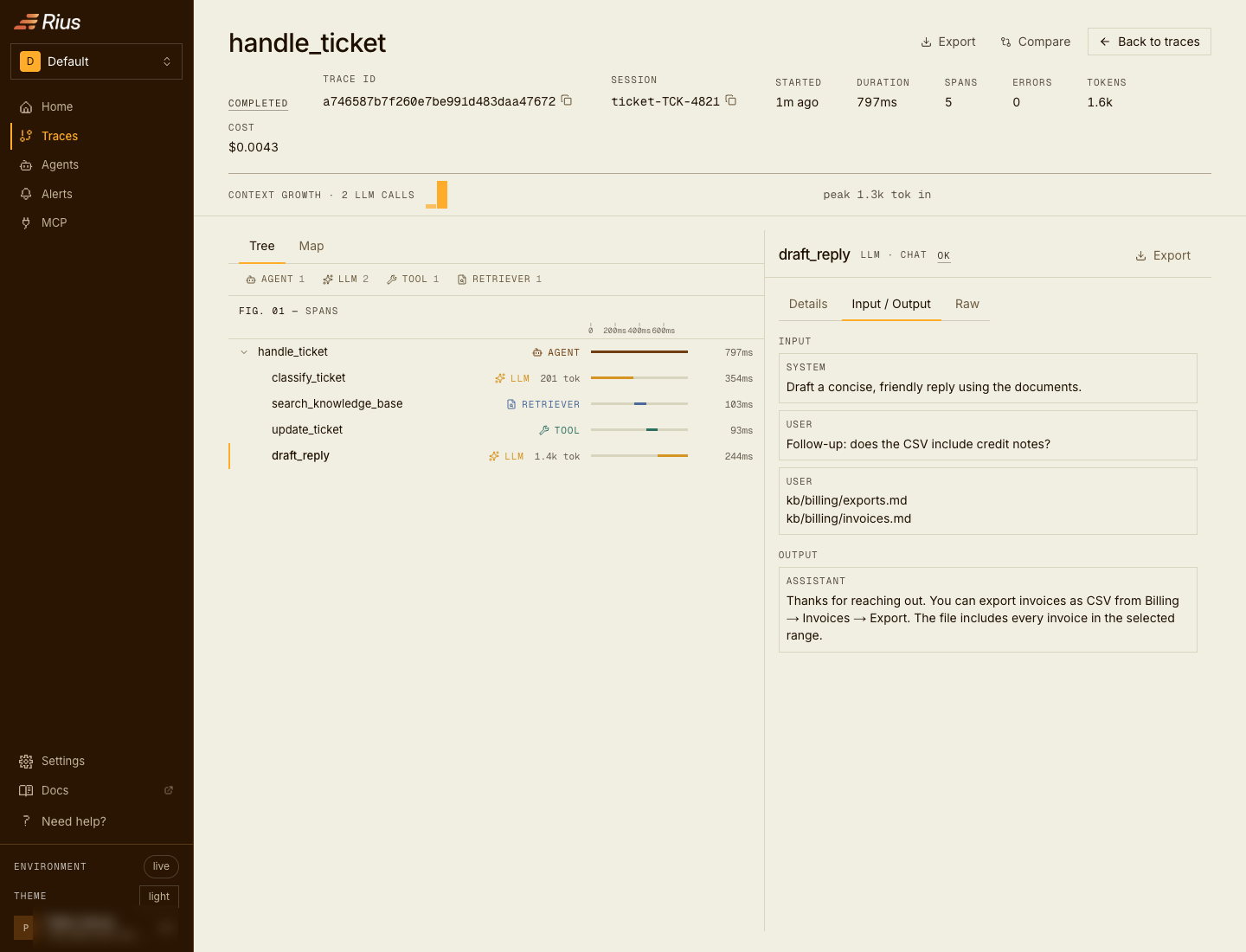
Default (capture_content=True): Input / Output carries the full content.
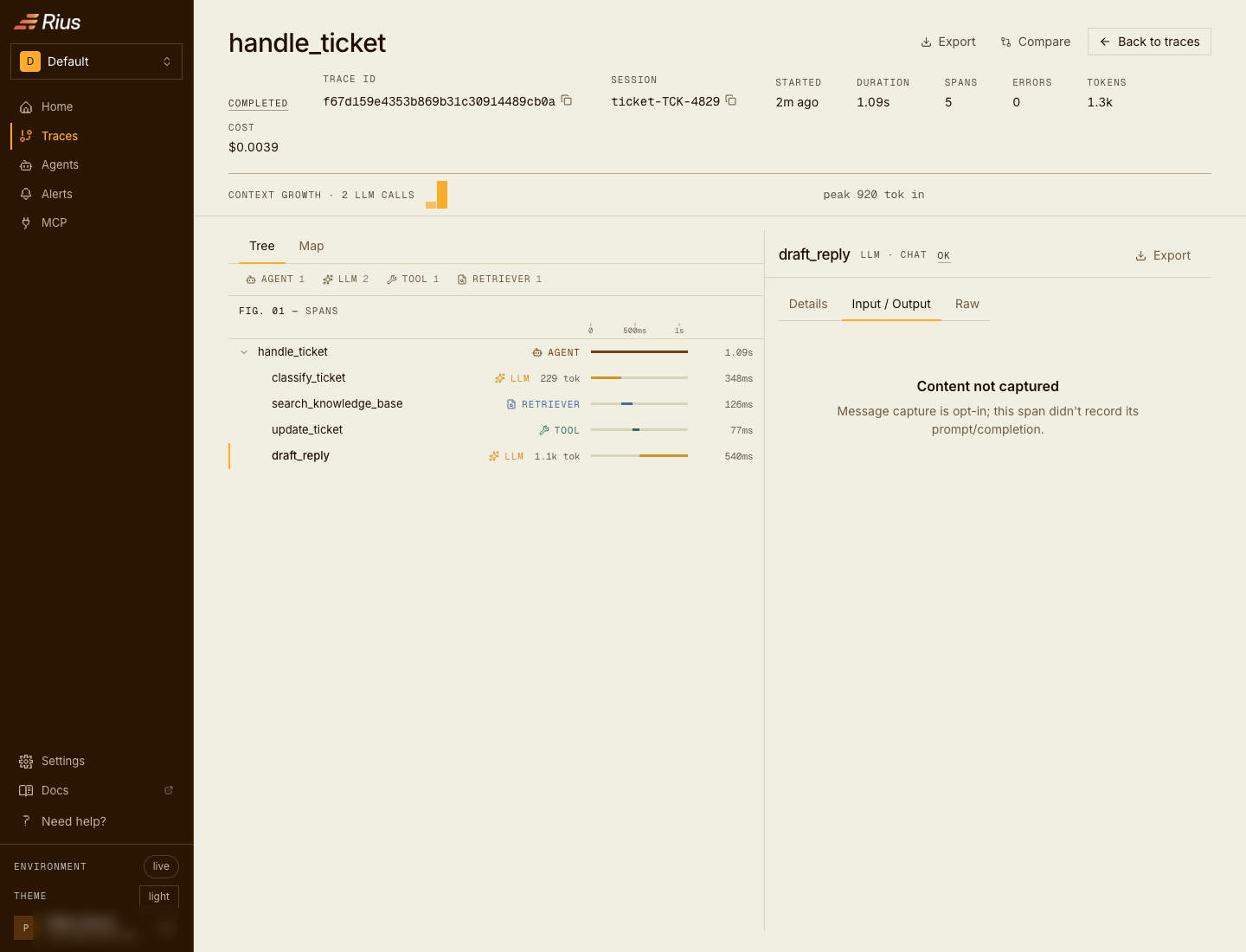
capture_content=False: the panels are empty; timings, taxonomy, and status still flow.
Exactly which attributes are covered
The switch (and masking, below) applies to the content attribute families of the SDK itself and of the third-party instrumentation it ships:
| Family | Attributes |
|---|---|
| Rius spans | input.value, output.value |
| Rius generations | gen_ai.input.messages, gen_ai.output.messages |
| Tool definitions | gen_ai.tool.definitions, gen_ai.tool.description, and the OpenInference tool.description / tool.parameters (the conventions mark these sensitive: definitions carry prompt engineering, and sometimes credentials in parameter defaults). gen_ai.tool.name is identity, not content, and always flows |
| GenAI tool calls and system prompt | gen_ai.system_instructions, gen_ai.tool.call.arguments, gen_ai.tool.call.result, as emitted by OpenTelemetry-native instrumentations such as the Vercel AI SDK’s @ai-sdk/otel. gen_ai.tool.call.id is identity and always flows |
| GenAI (third-party) | gen_ai.prompt, gen_ai.completion, and any gen_ai.prompt.* / gen_ai.completion.* |
| Vercel AI SDK | ai.prompt and ai.prompt.*, ai.response.text / object / reasoning / toolCalls / files, ai.toolCall.args / result, ai.value / values, ai.documents, ai.schema / ai.schema.description. Names, ids, and models (ai.toolCall.name, ai.model.id) are identity and always flow |
| OpenInference | llm.input_messages, llm.output_messages, and any llm.input_messages.* / llm.output_messages.* / llm.prompts.* / llm.prompt_template.*; the tool definitions under llm.tools / llm.tools.* |
| OpenInference request parameters | llm.invocation_parameters, whole. The SDK first lifts out the parameters it recognizes (model, temperature, max tokens, stop sequences, tool_choice, and the rest of the canonical set), so those survive as gen_ai.request.* and rius.request.tool_choice; whatever is left in the bag is unclassified and treated as content |
| Tool arrays passed as request parameters | gen_ai.request.tools, gen_ai.request.functions, rius.request.tools, rius.request.functions. Every other gen_ai.request.* and rius.request.* key is metadata |
| Documents and embeddings | any attribute ending .document.content or .embedding.text |
| MLflow / Traceloop | mlflow.spanInputs / mlflow.spanOutputs, traceloop.entity.input / traceloop.entity.output |
| Other tracing SDKs (Python) | Langfuse langfuse.observation.* and langfuse.trace.* input, output, and metadata; Logfire logfire.msg; MLflow mlflow.chat.tools, mlflow.trace.intermediate_outputs, mlflow.chunk.value; Traceloop traceloop.prompt.template / template_variables |
| Laminar (both SDKs) | lmnr.span.input, lmnr.span.output, lmnr.sdk.raw.response, and lmnr.association.properties.metadata with its members. metadata.tool_call_id, metadata.agent.name, and metadata.service.name are identity and always flow |
Indexed keys are matched by prefix, so
llm.input_messages.0.message.content is covered. Metadata siblings such as
.document.id and .document.score are deliberately not covered, so
retrieval analytics survive content stripping.
Attributes outside these families (your own set_attribute() keys, for
example) are never touched; treat custom attributes as content you control.
Both controls run after the SDK has normalized auto-instrumented spans onto
the canonical keys (see
what the SDK normalizes).
So a key-aware mask sees an OpenAI or Anthropic call’s messages as
gen_ai.input.messages and gen_ai.output.messages, the same keys as a
manual generation, rather than the flattened llm.input_messages.* keys the
integration’s package wrote. If you
wrote a mask that matches on llm.* keys before 1.0.0, match the canonical
keys instead.
Masking: transform instead of strip
When you need content but not the sensitive parts of it, pass a mask callable. It runs on every covered content attribute:
Python
def mask(value):
    return my_pii_scrubber(value)

rius.init(mask=mask)If the callable accepts a key keyword argument (or **kwargs), it also
receives the attribute name, so you can mask selectively:
Python
def mask(value, *, key: str):
    if key.startswith("gen_ai.input"):
        return scrub(value)
    return value

rius.init(mask=mask)Semantics you can rely on
- Runs at export, off the hot path. Masking executes in the background batch thread, on copies of span data, so it never mutates what other processors see and never slows your agent’s code.
- Fail closed. If the mask raises, or returns
None, or returns something that cannot be serialized, the affected attribute is dropped entirely and a warning is logged. The original value never leaks on any failure path, and the rest of the batch still exports. - Return types. Primitives pass through as-is; other objects are serialized to JSON (truncated at 32 KB, the SDK’s attribute cap).
- Composition.
capture_content=Falseis applied first; the mask then runs on whatever content attributes remain.
The TypeScript SDK covers the same attribute families and composes the two
controls the same way, and its mask also runs in the exporter chain rather than
on your agent’s hot path. Since TypeScript 1.7.0 it also fails closed: a
mask that throws drops the attribute and logs a warning, and one that returns
undefined or null drops it without a warning. Earlier releases write the
literal [mask error] in place of a value the mask threw on.
Exceptions, stacktraces, and status messages
Errors carry content too, and it matters: a provider error routinely echoes the offending request back in its message, and a stacktrace can carry it in a frame argument. Both SDKs treat the three places that text lands the same way.
With content capture off (capture_content=False in Python,
captureContent: false in TypeScript):
- The exception event’s
exception.messageandexception.stacktraceare stripped. The event itself andexception.typeare kept, so failures stay visible and countable. - The ERROR status description, which
record_exceptionand the SDK’s own helpers fill with the error text, is dropped. The ERROR status code remains.
With a mask and content capture on:
- The mask runs over the status description in both SDKs. It sees the key
status.description, so a key-aware mask can treat it specially. - The mask also runs over
exception.messageandexception.stacktraceon the exception event, in Python and since TypeScript 1.7.0. Earlier TypeScript releases send those two unmasked, so on them setcaptureContent: falseif error text is sensitive: masking alone does not cover it.
Choosing between them
- Regulated environment, content must never leave:
capture_content=False. - Content is useful but contains PII: a mask with your scrubber.
- Different rules per attribute family: a key-aware mask.
Next steps
- Reliability: the export pipeline both controls run inside.
- Troubleshooting: when content or traces go missing unexpectedly.