Introduction
Tares is the open-source platform for always-on AI agents. Chat agents wait for a prompt. Tares agents wait for an event: every event from your systems lands on one timeline per thing, a trigger wakes an agent the moment it matters, and the finding it writes back is there for the next reader.
Using a coding assistant? Start with AI resources, a page written for it.
What is Tares?
Tares sits between the systems you already run and the agents you want working on them.
- Connect anything that emits events. Logs, metrics, alerts, deploys, commits, database rows, webhooks. A connector turns each one into events; nothing to change on the source side.
- One timeline per thing. Every event that concerns a service, a repo, a customer or a job is
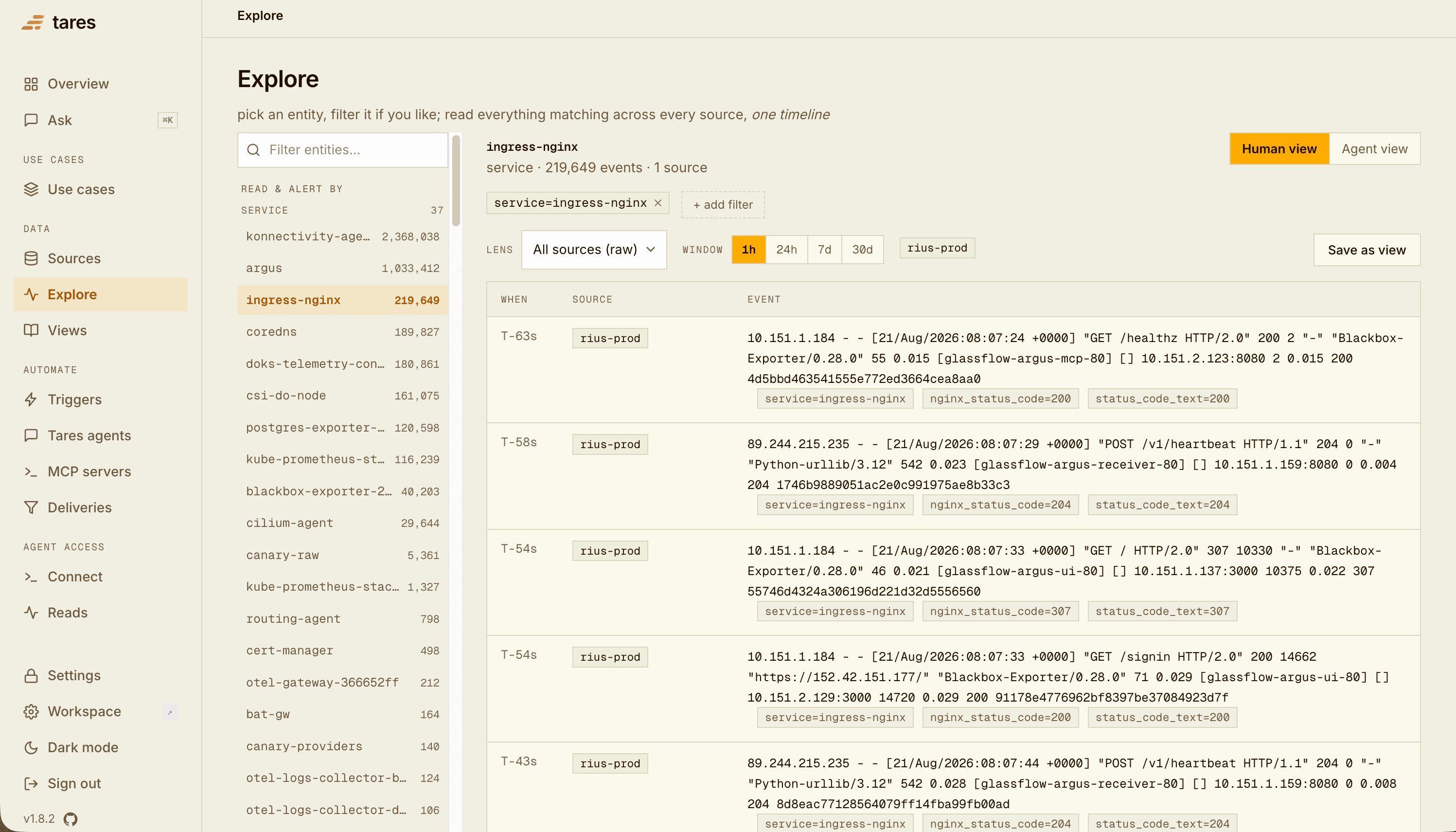
merged into one time-ordered timeline for it. An agent asks “what happened to
checkout?” once and gets the whole picture, across all sources. - Agents that run on what happens. Triggers watch the timelines. When a condition fires, Tares wakes an agent with the correlated timeline already in hand, over MCP or a webhook, or runs a Tares agent in-process.
- Findings that stay. What the agent concludes is written back onto the timeline as an event. The next reader, human or agent, starts from the last conclusion instead of from scratch.
Tares is MIT licensed, runs on your machine or your server, and stores everything in one local DuckDB file. No external database, no broker, no telemetry.
How it works
Four steps.
- Sources bring events in. Poll connectors (Prometheus, GitHub, Postgres, Docker logs) fetch on an interval; push connectors (OTLP, Alertmanager, Vercel, webhooks) receive over HTTP. Each event keeps its original payload. Connectors
- Labels join sources on a shared key. Events labeled
service=api-serverfrom logs, metrics, alerts and deploys read as one timeline forapi-server. Concepts - Triggers watch a set of sources and fire on a condition: an alert lands, an error rate crosses a line, a commit touches a path. A cooldown keeps one incident from firing a hundred times. Triggers
- Agents get woken. An external agent receives the timeline over a webhook or reads it over MCP; a Tares agent runs inside Tares on your prompt and writes its finding back. Tares agents, Connecting agents
A project holds the triggers and agents that do one job, the sources they read, and the skills its agents follow, and shows everything that happened on one page. Projects
Underneath, one daemon (taresd) serves the HTTP API and the console, and tares-mcp exposes the
read and watch tools to any MCP client.
Two ways to build
Keep the agent you have (Claude Code, Cursor, Codex, your own loop) and give it one MCP call that returns the correlated history of anything. Best when you already run an agent and want it to stop stitching ten tool calls together.
Your agent, better informedWrite a prompt, attach it to a trigger, done. Tares runs it in-process when the trigger fires, reads the timeline, and writes a finding. Best when nobody is at a keyboard when it matters.
A Tares agent on a triggerThe two combine: a Tares agent writes the first look, your coding agent picks it up from the timeline when you sit down.
Key capabilities
- Correlated reads.
read(selector, window)returns any entity’s timeline across all sources, or only a project’s;create_triggerlets an agent set up its own watch. - Triggers and delivery. Conditions over live data, cooldowns, delivery to webhooks, Slack channels and Tares agents, with every attempt logged and retried.
- Tares agents. Prompt plus trigger; runs on your model provider, read-only by default, with external MCP servers opt-in per agent. Each run is metered.
- Findings and memory. Conclusions become events on the timeline;
rememberwrites observations back for the next read. - Projects and skills. One page per job with its activity as threads; skills give a project’s agents shared instructions they load when a task matches.
- Console and Ask. Projects, Sources, Triggers, Tares agents, Firings, Explore, and Ask, an assistant over your own data (⌘K).
- Slack. Subscribe a channel to any trigger; ask back with
/tares ask.
Choose your path
Install, connect one source, connect your agent. About five minutes.
QuickstartSay what a project should achieve; Tares plans the sources, wake-ups and agents, shows you the plan, and sets it up when it looks right. The result is an ordinary project.
Guided setupStart from a Tares template, or assemble a project from objects you already have.
ProjectsThe hosted version: sign up, connect sources, same timeline and MCP endpoint.
Tares CloudDeveloper tools
The tares CLI starts and inspects an instance:
uv tool install tares      # or: brew install glassflow/tap/tares
tares up                   # daemon + console on http://127.0.0.1:8787
tares status               # readiness checklist and the one next step
Your coding agent can do the whole setup for you. Paste this into Claude Code, Codex or Cursor:
Run
npx skills add glassflow/tares --skill taresand use the tares skill to install Tares and connect it to this agent.
Full reference: CLI, HTTP API.
Popular projects
An alert fires; the agent reads the service’s whole timeline and writes the diagnosis before anyone opens a dashboard.
AI SREConnect your logs, metrics, alerts and deploys, and an agent investigates each alert as it fires.
Use AI to monitor your systemsBuild a software factory with Claude Code: a crew of Claude Code sessions takes your projects from tickets to merged pull requests.
Software factory for Claude CodeCommits land; when a change matters to the team, the agent opens a pull request against the shared context repository.
Shared code contextFailed jobs, sandbox runs, voice calls: each gets a timeline, a trigger on failure, and a finding that says what broke.
Anything with a failure modeHelp
Stuck, found a bug, want a connector or feature Tares doesn’t have yet, or have questions about Tares Cloud? We’re building against real use cases and reply quickly.
- Email: help@glassflow.ai
- Book a call: cal.com/ashishbagri/glassflow
- GitHub: open an issue for bugs and feature requests