MCP
Connect Claude, Cursor, and other AI clients to Rius and query your agent’s traces from where you already work. Ask “what was my agents’ error rate yesterday?” in plain language, and your client answers from your real telemetry: trace lists, cost and token summaries, and full span waterfalls.
Two different things share the MCP name. This section is about the Rius
MCP server, an endpoint your AI client connects to for querying your
telemetry. The SDK’s mcp integration
is the opposite direction: it traces your agent’s own outgoing MCP tool
calls. Same protocol, opposite directions. Neither requires the other.
Quick connect
Pick your client. The server key is rius and the server URL is
https://mcp.eu.console.rius-glassflow.com/mcp. On a machine where you can
open a browser, sign-in is your Rius account over OAuth and your client
handles the flow for you. For agents that run without a browser, use a
read-scoped API key instead: see headless connections.
The console’s MCP page shows these same snippets templated for your
deployment.
Using the Rius plugin for Claude Code,
Codex (beta), or
Cursor (beta)? It already registers this
server as rius, so you don’t need to add it again.
Claude Code
Run in your terminal. The OAuth sign-in opens the first time a session uses the server:
claude mcp add --transport http rius https://mcp.eu.console.rius-glassflow.com/mcpHeadless connections
Agents that run without a browser, including CI jobs, cron schedules, and
autonomous coding sessions, authenticate with a read-scoped API key sent as a
static Authorization header instead of completing the OAuth flow. Both auth
paths are accepted side by side, so adding a key changes nothing about your
interactive sessions.
Mint a read-scoped key
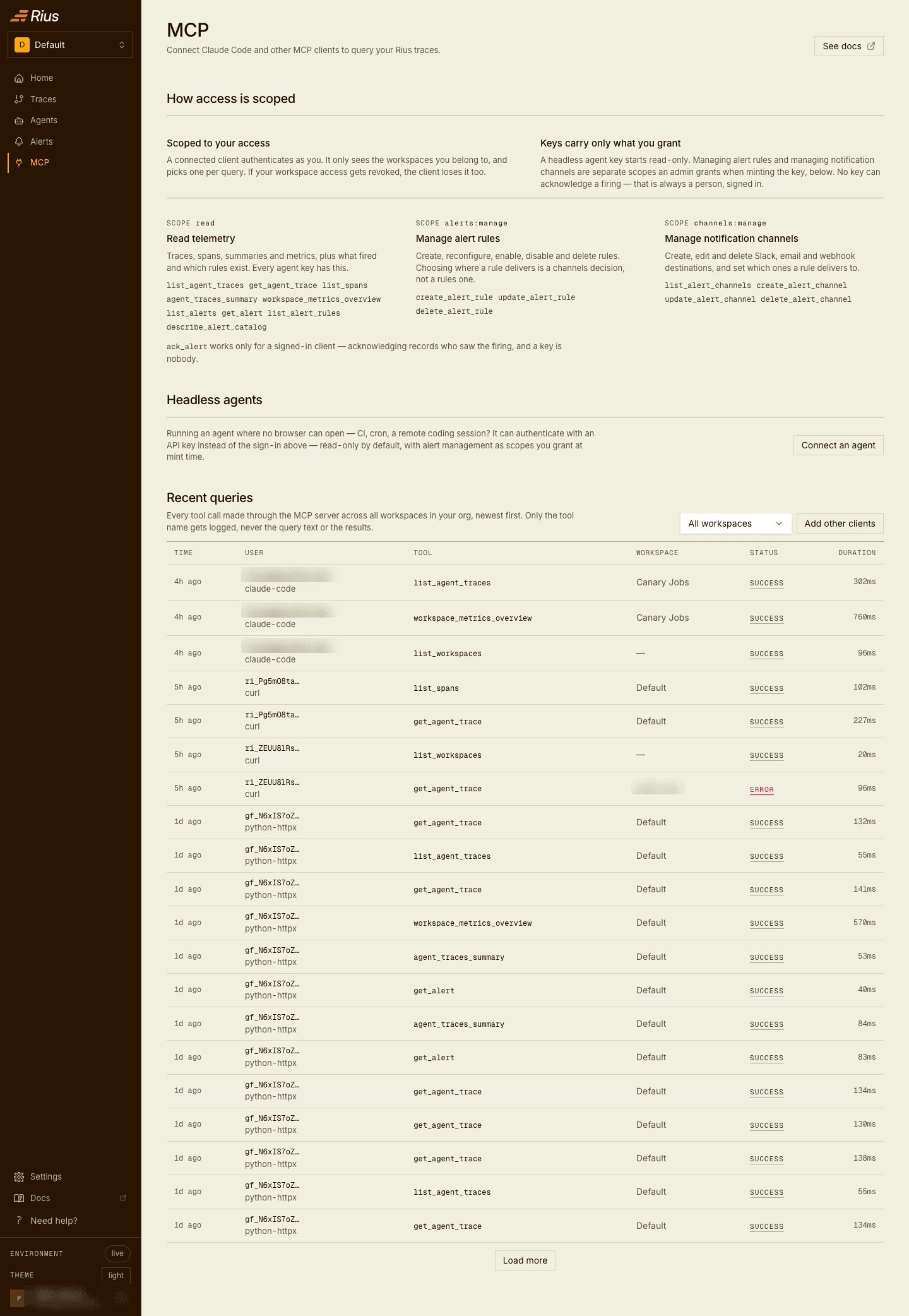
The quickest route is the console’s MCP page, which has a Connect an agent button under “Headless agents”:
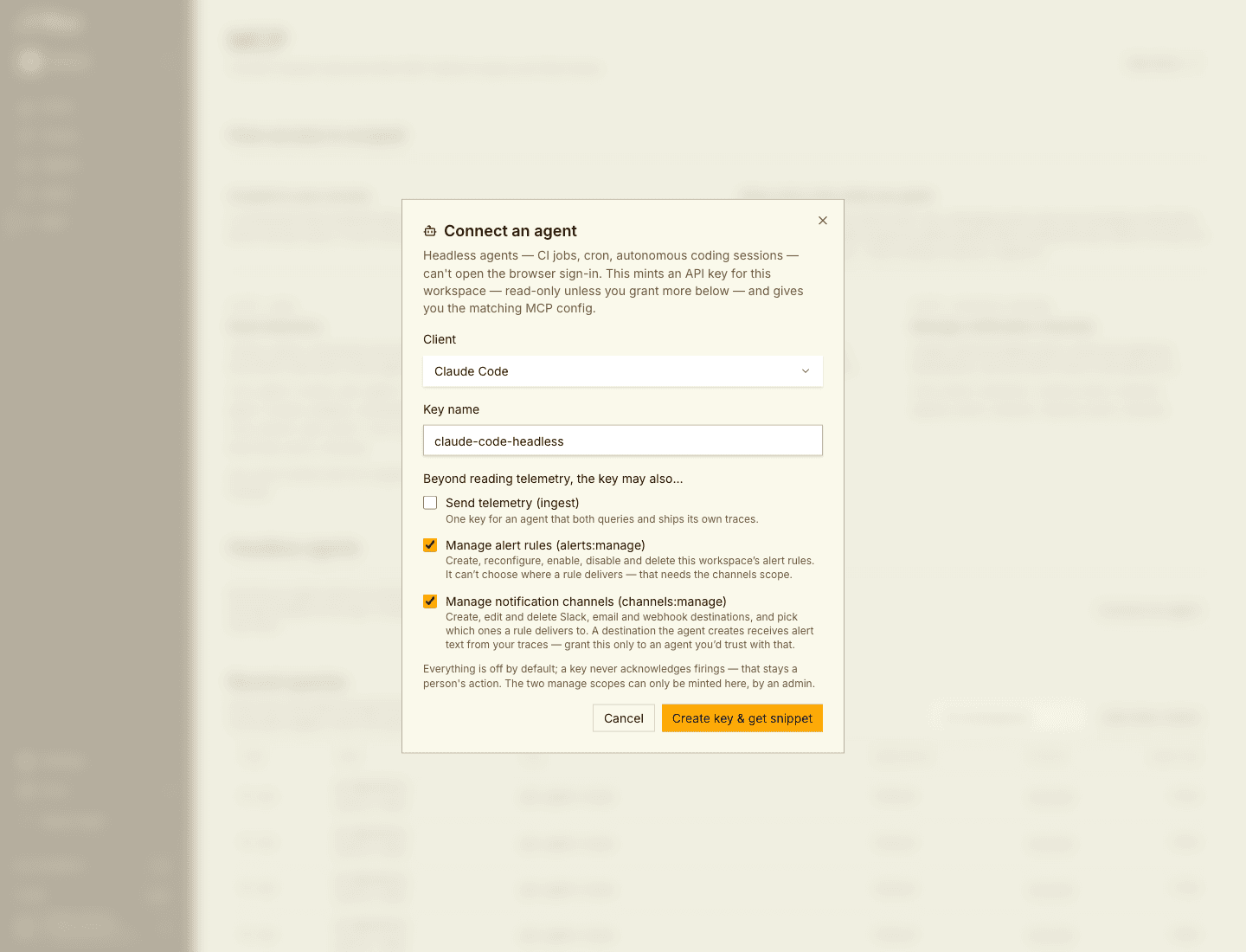
It mints a read-scoped key and hands you the matching config for your client in one step, so you do not have to assemble the header yourself:
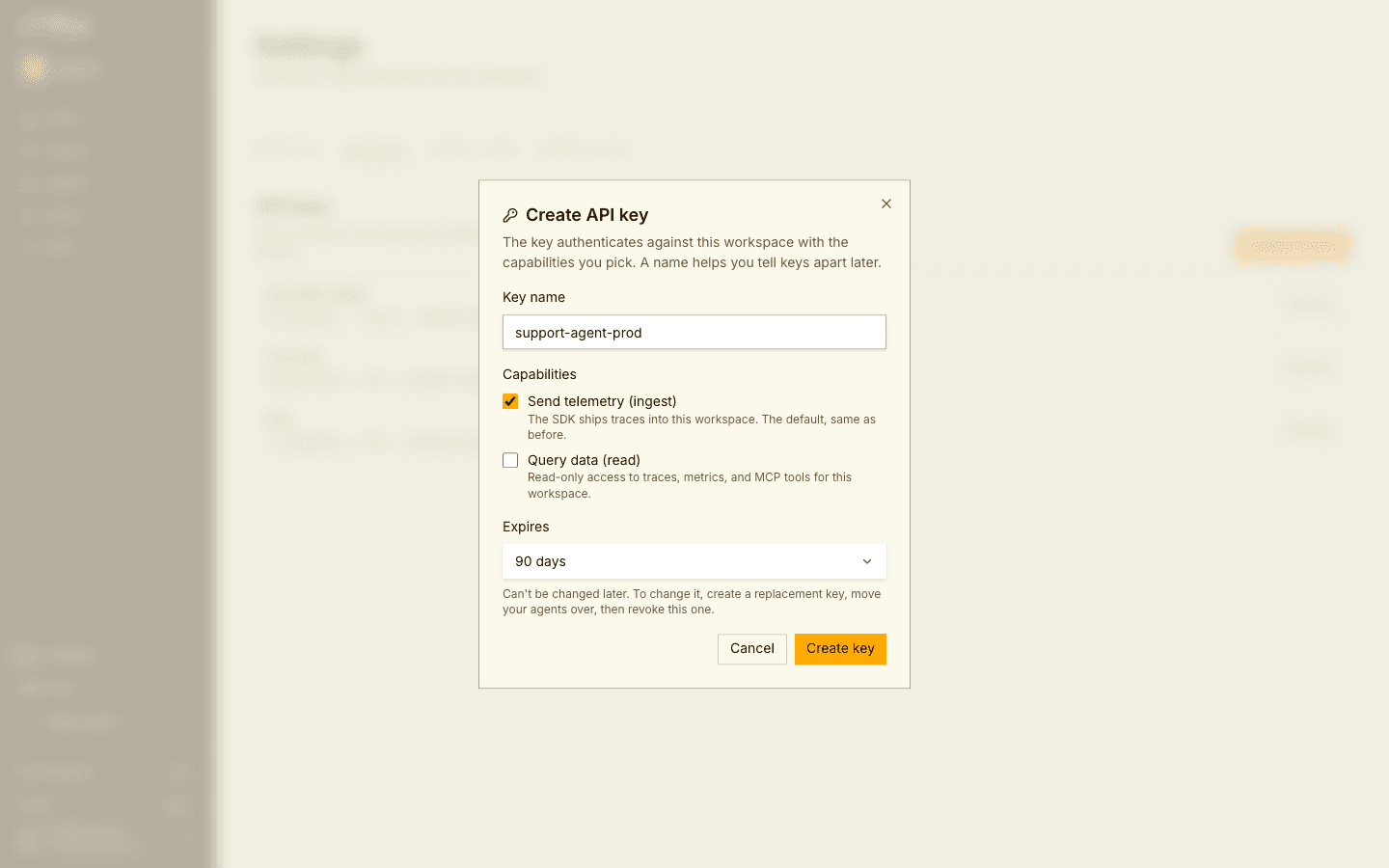
Two other routes reach the same place. In Settings → API keys, Create API key lets you pick capabilities directly, which is also where you go for a key that both queries and ships telemetry:
Or ask an interactive MCP session to run create_api_key with
scopes: ["read"].
The read scope is the one an MCP connection needs. Ingest keys, which is
what the SDK uses and what you get when no capability is chosen, can’t query
through the MCP server.
A bare agent key is read-only. To let an agent manage alerting as well, tick
Manage alert rules (alerts:manage) or Manage notification channels
(channels:manage) in the Connect an agent dialog. These two scopes are
minted only there, and only by an admin; the Create API key dialog in
Settings does not offer them. With either scope the alert-management tools
work; without them the tools are still listed, but each one replies that the
key isn’t allowed and changes nothing. A key never acknowledges a firing; that
stays a person’s action. See
Roles and permissions.
The key is shown exactly once. Store it as a secret, for example a
RIUS_API_KEY environment variable or a CI secret, and keep it out of
committed config files. Prefer your client’s environment-variable expansion
where it has one.
Connect with the key
Same URL and transport as an interactive connection, with the key as a bearer token:
Claude Code
claude mcp add --transport http rius https://mcp.eu.console.rius-glassflow.com/mcp \
--header "Authorization: Bearer ${RIUS_API_KEY}"The header path skips OAuth discovery entirely, so a client that only supports a static bearer header works here even though it cannot complete the interactive flow.
What a key-authenticated connection can do
A key without manage scopes reaches these tools: get_me,
list_workspaces, the trace and span tools (list_agent_traces,
get_agent_trace, list_spans, agent_traces_summary,
describe_search_catalog), the agent and user tools (list_agents,
agent_error_groups, agent_lifecycle_events, agent_versions,
compare_agent_versions, list_users, user_activity_summary,
list_silent_failures), the metrics tools (workspace_metrics_overview,
list_metrics_catalog), and the alert reads. A key minted
with alerts:manage or channels:manage additionally reaches the
alert-management tools for its workspace. Five limits are deliberate rather
than bugs:
- The key is bound to the single workspace it was created in. Other workspaces report as not found.
create_api_keyis denied, so a leaked agent key cannot mint more keys. Use an interactive session or the console for key management.get_spend_noticesis denied, because billing notices are for organization admins and need an admin’s interactive session.get_mereports the accessible workspaces without a user identity, because a key is not a person.- Revoking a key can take up to a minute to be reflected when a client reconnects, since validation results are cached briefly.
Check a key from CI
A 200 response to an initialize call proves both the key and the server,
with no MCP client involved:
curl -sf -X POST https://mcp.eu.console.rius-glassflow.com/mcp \
  -H "Authorization: Bearer ${RIUS_API_KEY}" \
  -H "Content-Type: application/json" \
  -H "Accept: application/json, text/event-stream" \
  -d '{"jsonrpc":"2.0","id":1,"method":"initialize","params":{"protocolVersion":"2025-06-18","capabilities":{},"clientInfo":{"name":"ci-smoke","version":"0"}}}'
Verify the connection
Ask your client:
Who am I in Rius, and which workspaces can I access?
The client should call the get_me tool and answer with your email and a
workspace table. If it does, everything works; head to the
example workflows.
Troubleshooting
- The browser sign-in loops or the client reports an auth error. Remove and re-add the server; a stale cached token is the usual cause after a long idle period.
- The client connects but lists no tools. Check you completed the browser sign-in: most clients show the server as connected before the OAuth flow has finished.
- Your organization uses SSO restrictions. The MCP server accepts the same accounts as the Rius console; if you can sign in to the console, the MCP sign-in works too.
- A headless connection is rejected with 401. The key is revoked or mistyped. Mint a fresh one and retry.
- A headless connection works but tools return 403 “API key lacks the
required scope”. The key has no
readscope, which is the default for the ingest keys the SDK uses. Mint one with the read capability. The key itself is valid, so this is a scope problem rather than an auth problem. create_api_keysays a key cannot mint more keys. Expected on a headless connection: key-authenticated connections cannot mint keys. Use an interactive session or the console.
What you can ask
The server exposes tools over your workspaces, metrics, and traces. Your client picks the right ones for a question like:
- “Summarize my agent traffic over the last 24 hours.” (KPIs: traces, LLM calls, error rate, cost, tokens, latency percentiles)
- “List the failed runs from this week and show me what went wrong in the worst one.” (trace list filtered by status, then a span waterfall)
- “Which service is spending the most right now?”
See the tool reference for every tool and its arguments, and example workflows for complete investigation patterns.
Every tool carries a title and hints that say whether it only reads or changes something, and whether a change is destructive, such as an alert update that replaces a whole list. Clients that honor the hints can auto-approve reads and ask you to confirm writes.
MCP usage in the console
The console’s MCP page shows how MCP clients use Rius across your organization. Its tabs are covered in Usage and access.
Name your agent
A client can declare its own agent name with the X-MCP-Agent-Name header,
set once in the client’s server config next to the Authorization header:
{
  "mcpServers": {
    "rius": {
      "type": "http",
      "url": "https://mcp.eu.console.rius-glassflow.com/mcp",
      "headers": {
        "Authorization": "Bearer ri_...",
        "X-MCP-Agent-Name": "release-triage-bot"
      }
    }
  }
}
The name is UTF-8 text of up to 128 characters. A longer name, or one with control or invisible formatting characters, is ignored rather than cut.
What Rius logs about MCP calls
For each MCP call, Rius records the tool, the client and session, the outcome, the latency, the number of rows returned, and the call’s arguments under an allow-list:
- Kept: structural arguments such as the workspace, the time window, limits, statuses and other fixed choices, the agent, service, and instance asked about, and ids such as a trace, session, or alert id. For a filter, only its field and operator are kept, not the values it matches.
- Never kept: free text such as search terms and error text, webhook URLs, email recipients, and names and configuration you write. An argument the allow-list does not know is dropped.
- Never stored: tool results.
Call-log rows are kept for 30 days. The Queries tab shows the log.
Access and permissions
There are two ways to authenticate, and what the tools can reach depends on which one you use and, for keys, on the scopes it was minted with.
An OAuth session is your Rius account, with the client handling the
browser flow automatically. The tools see exactly the workspaces your user can
access, and act with your role: reading is open to every member, acknowledging
a firing is open to every member, and create_api_key, the
alert-management tools, and get_spend_notices work only for admins, the
same as in the console.
An agent key reaches the one workspace it belongs to and carries no user
identity. A bare key is read-only. A key minted with alerts:manage or
channels:manage can also manage alert rules or distribution channels in
that workspace. No key can mint other keys, acknowledge a firing, or read
spend notices. See
headless connections.
If you belong to several organizations, get_me lists all of them with
their workspaces. A tool’s workspace argument takes a name or an ID; when
the same workspace name exists in more than one of your organizations, pass
it as org/workspace, because an ambiguous name returns an error.
Nothing the MCP server offers can create, rename, or delete workspaces, or change members; those stay in the console.