Multi-tenant agent observability: one workspace per customer
You build agents and sell them: an agent product, an agency running agents per client, a platform with agent features. Each of your customers needs their telemetry isolated from every other customer’s, and you need to see cost and health per customer. With Rius, you do that by treating each customer as its own workspace: the security and observability boundary for multi-tenant deployments. This guide is the opinionated way to set that up.
TL;DR: Give every customer their own workspace. The workspace is the boundary Rius actually enforces, so isolation, per-customer cost, alerts, and customer-facing visibility all fall out of that one decision.
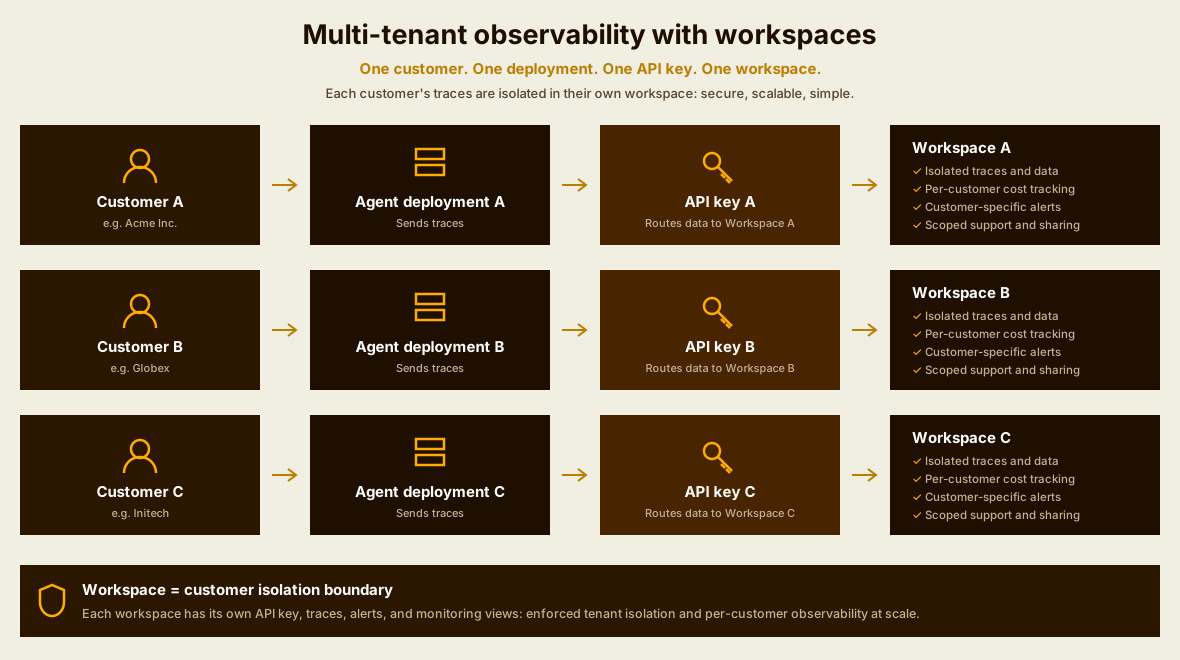
The mapping
| Your world | In Rius |
|---|---|
| You, the vendor | The organization |
| One of your customers | One workspace |
| The agents you run for that customer | Agents (services) inside the workspace |
| One conversation or task run | A session |
| Your customer’s end users | A user_id span attribute |
Workspace-based tenant isolation
For multi-tenant observability, treat each customer as a separate workspace: the workspace provides the isolation boundary for that customer’s traces, cost, alerts, and support access. This pattern is not a naming convention; it lines up with what the platform enforces:
- Every trace belongs to exactly one workspace, determined by the API key it was sent with. The server derives the workspace from the verified key, never from anything the request claims.
- A leaked key exposes one customer, never the fleet. Keys, MCP agent keys, alert settings, and shared views are all scoped per workspace.
- Per-customer cost needs no tagging discipline. Token and cost rollups are per workspace, so “what does customer X cost us” is the workspace’s own monitoring view, not a query you have to maintain.
There is no limit on the number of workspaces in an organization, so the pattern holds whether you have five customers or five hundred.
When a single workspace is enough
A single workspace can work when customer isolation is not required.
You can identify customers with a customer_id span attribute
(span.set_attribute("customer_id", ...)), but that gives you logical
rather than enforced isolation. Be aware of what else you give up:
attributes are stored and inspectable on traces, but they do not drive
analytics, so there are no per-customer cost or error rollups; and one API
key covers everyone. What each approach gets you:
customer_id attribute | Workspace per customer | |
|---|---|---|
| Identify the customer on a trace | ✓ | ✓ |
| Isolated API keys | ✗ | ✓ |
| Per-customer cost rollups | ✗ | ✓ |
| Per-customer alerts | ✗ | ✓ |
| Scoped support access | ✗ | ✓ |
| Customer-facing trace access | ✗ | ✓ |
Teams that start with the attribute and grow tend to migrate to workspaces later, with a mixed history that straddles the cutover. If customers are your business model, start with the workspace pattern.
Onboarding a customer
Repeat this runbook for each new customer. The steps are in the console.
-
Create the workspace. From the workspace switcher at the top of the sidebar, choose Create workspace… (organization admins only). Name it after the customer and pick its region.
-
Create its API key in Settings → API keys inside the new workspace. The key is shown once; put it straight into your secret store, keyed by customer.
-
Deploy the customer’s agents with that key. With one deployment per customer, configuration is two environment variables:
export RIUS_API_KEY="ri_..."          # this customer's workspace key
export RIUS_SERVICE_NAME="support-agent"  # the agent, same name across customers
Use the same service name for the same agent across customers: the workspace already says whose it is, and keeping names stable lets you compare the same agent’s behavior between customers.
-
Verify the first trace. Run one task and check the workspace’s trace list, the same check as the quickstart.
-
Optional: connect support tooling. Create an MCP agent key in the workspace so a coding agent or support engineer can query exactly that customer’s traces and nothing else.
Routing traces to the right workspace
One key per workspace means each customer’s traces must be sent with that
customer’s key. A shared runtime serving many customers does this with
workspace scopes (glassflow-rius 0.13.0, @glassflow-ai/rius 0.4.0):
register the keys once, then wrap each request in its customer’s scope.
Python
import rius

rius.init(
    api_key=ops_key,  # spans outside any scope go to your own workspace
    service_name="support-agent",
    workspaces={"acme": key_acme, "globex": key_globex},
)

with rius.workspace("acme"):
handle(request) # every span of the request lands in acme's workspaceEverything started inside the scope routes together: observe wrappers,
generations, sessions, and the spans auto-instrumentation creates, because
the scope rides OpenTelemetry context the same way sessions do. For keys
fetched at runtime (a new customer signs up, a key rotates), call
rius.register_workspace(alias, key) / registerWorkspace(alias, key);
passing workspaces={} at init opts into routing with no static routes.
Two rules to build around:
- One trace, one workspace. The backend derives the workspace from the key, so a trace split across scopes would come apart. Enter the scope at the request boundary, before the root span starts; the SDK warns if a span starts under a different workspace than its parent.
- Instance liveness reports under your default workspace. The Agents view heartbeat authenticates with the default key, so a shared runtime appears as one instance in your own workspace, not one per customer.
The simpler shape remains available: one process (or deployment) per
customer, each calling plain init() with the customer’s key from an
environment variable, as in the onboarding runbook above. If you already
isolate customer runtimes for other reasons, that gives you routing with
no scopes at all; workspace scopes are for when one runtime genuinely
serves many customers.
Operating per customer
With customers as workspaces, the per-workspace surfaces become per-customer surfaces:
- Cost: each workspace’s monitoring view shows spend, cost by model, and token totals for that customer, the input to your own pricing.
- Alerts: alerting is configured per workspace, so detection runs and fires per customer, and acknowledging one customer’s alert never touches another’s.
- Support access: an MCP agent key per workspace scopes any tooling to one customer’s traces.
- Customer-facing visibility: shared views hand a customer a read-only, frozen window of their own traces, optionally failed-only, with an expiry, and without a Rius account. A weekly shared view is a lightweight “here is how your agent behaved” report.
Current limitations of workspace-based multi-tenancy
Stated plainly, so you can plan around it:
- Provisioning is manual. Workspaces and API keys are created in the console, so onboarding a customer is the runbook above.
- No cross-workspace rollup in the console. You see one customer at a time; an organization-level usage view is planned as part of billing. Meanwhile, the MCP server can list your workspaces and fetch each one’s metrics, which is enough to script a weekly all-customers summary.
- No per-customer end-user analytics. A
user_idspan attribute is carried and inspectable per trace, but there are no per-user rollups.
Next steps
- Settings: workspaces, API keys, and shared views in detail.
- Installation and configuration:
init(), environment variables, and scoped clients. - Working with sessions: scoping one conversation or task run.
- MCP server: querying a workspace’s traces from an agent.