Agents
The Agents page lists every agent sending traces to your workspace. Open an agent to see how it is doing: whether its processes are alive, its failed traces and cost, how full its context window gets, and whether the latest version changed anything.
You don’t register agents. Rius finds them in your traces and heartbeats.
Sessions from the Rius plugin show up as an agent named after the coding
agent: claude-code for the Claude Code plugin,
codex for Codex, and cursor for
Cursor.
Trace figures (Traces, Failed traces, Error rate, Cost, latency, and the rest) count only finished traces, so a run shows up in them once every span of it has ended, and a long session still in progress never stretches a latency percentile. Running work shows in Open traces, on Instances, and as running… under Recent traces.
What you can answer here
Which agent is getting worse?
Scan the Errors and Cost columns of the agents list, then open the agent. Check Drift for a rising failed rate, time to first token (TTFT), or cost per trace, and Exceptions to see whether it is one cause or several. When one agent is clearly behind the others, that is the one to fix first.
Did the last release help or hurt?
Tag runs with RIUS_MAIN_AGENT_VERSION, then compare versions in
Versions and Drift. If the new prompt or model raised the failed
rate or cost per trace, you see it from the day it shipped.
Is this agent on the right model?
Put Cost and TTFT p50 next to Peak usage in Context. An agent that uses a small share of its context window, starts answering slowly, and costs a lot is a candidate for a smaller, faster model. An agent close to 100% peak usage needs a larger window, or less history in each prompt.
Did it crash, or did it shut down?
Check Instances. stopped means the process exited and sent its final
heartbeat. gone means it stopped sending heartbeats without one, which
usually points to a crash, an out-of-memory kill, or a deploy that sent
SIGTERM.
Are errors actually hurting runs?
Compare Error rate with Failed traces. A high error rate with few failed traces means the agent recovers, for example with retries or fallbacks. That costs time and money but doesn’t break the result. A failed trace is a run whose root span ended in error.
The agents list
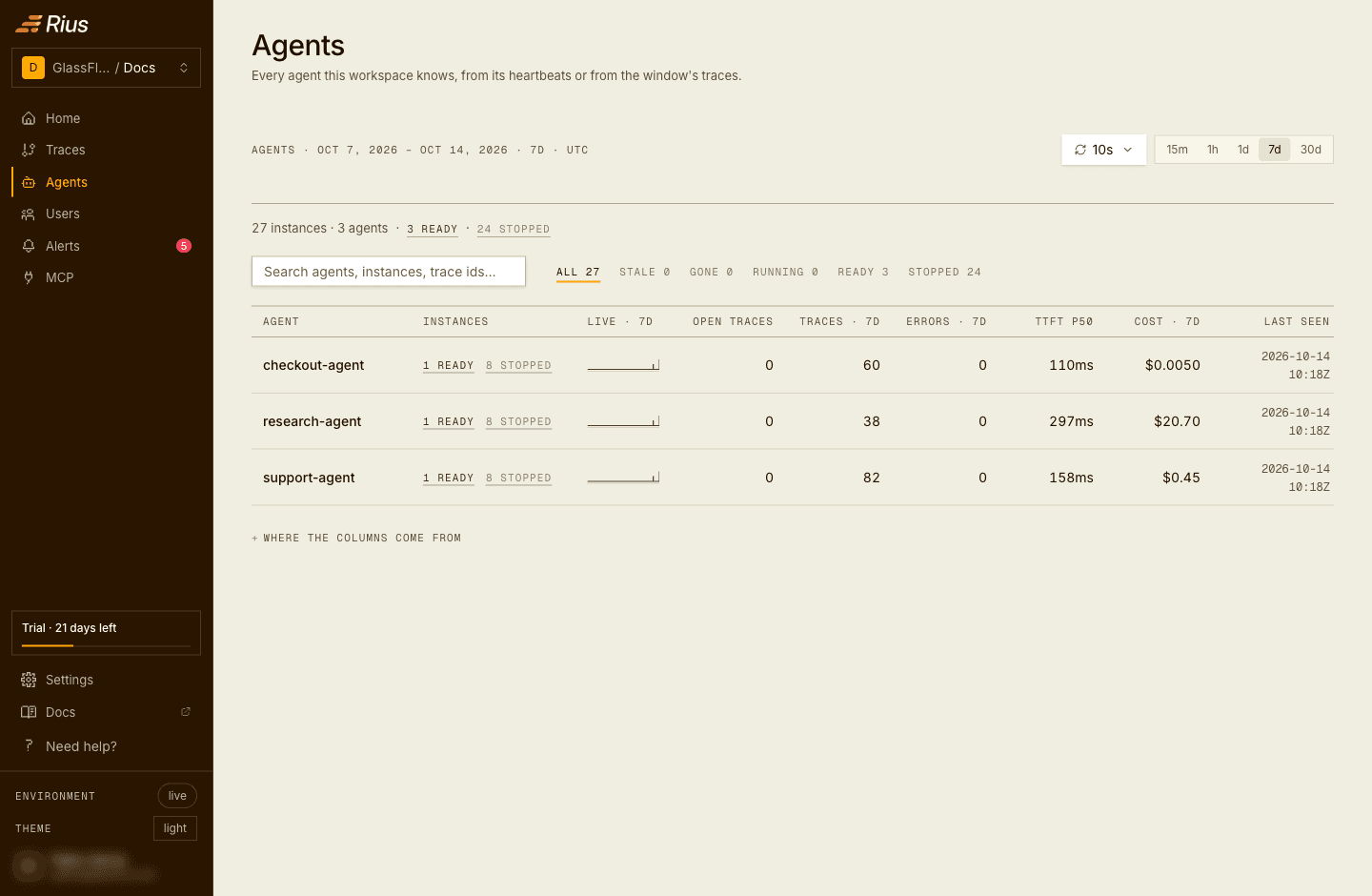
Each row is one agent: its instances and how many are live, its open traces, and its traces, errors, time to first token, and cost over the selected window, with when it was last seen. Rows with problems come first. An agent that sends traces but no heartbeat is marked no heartbeat.
Search by agent name, instance ID, or the ID of a trace a live instance has open, then click a row to open the agent’s page.
The agent page
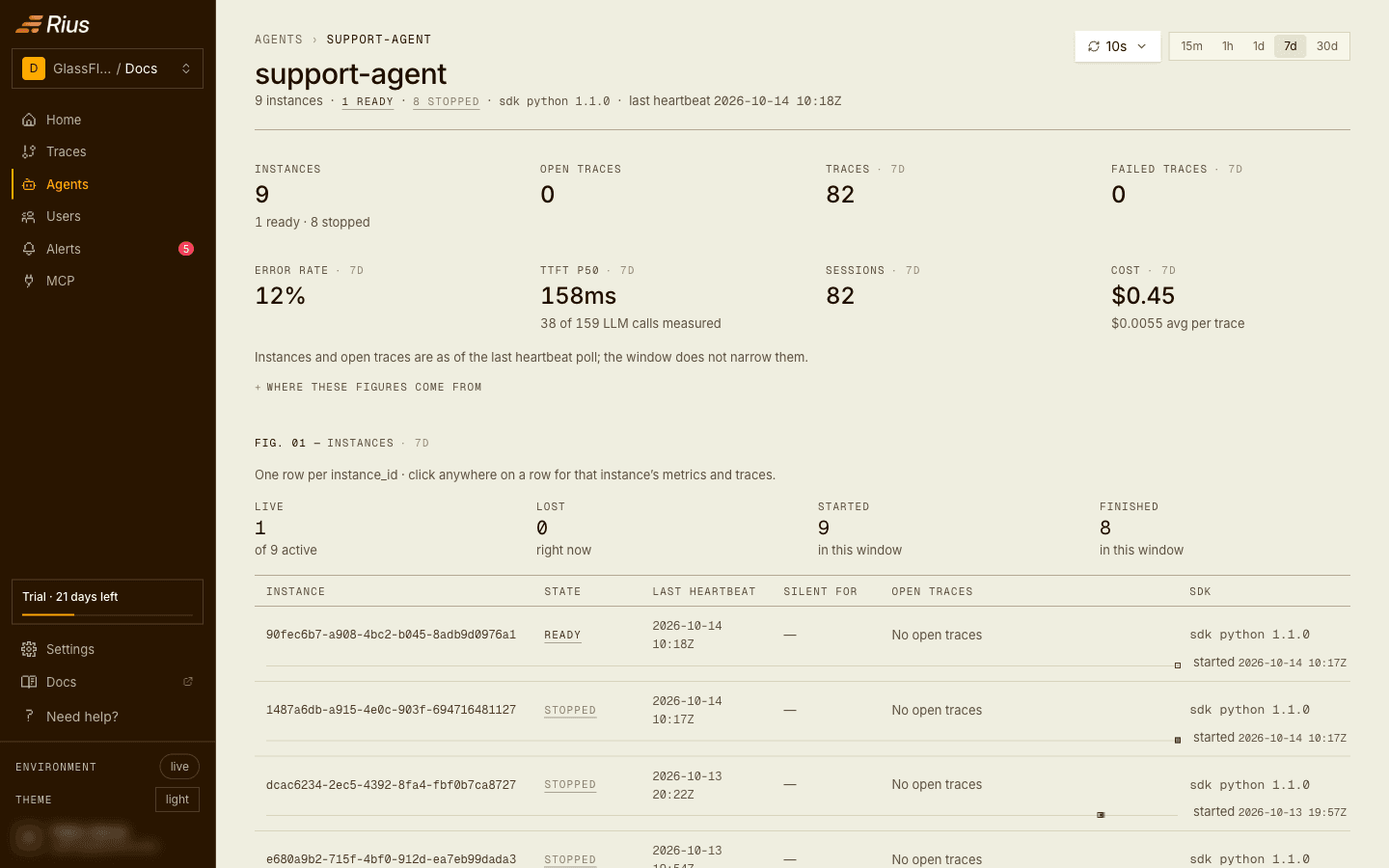
The agent page shows one agent from top to bottom: a summary, then instances, context, versions and drift, recent traces, errored traces, exceptions, and lifecycle events.
- The time window (15m, 1h, 1d, 7d, 30d) in the top right scopes everything except Instances and Open traces, which always show the latest heartbeat.
- Auto-refresh runs every 10 seconds by default.
- Click an instance ID anywhere on the page to show only that instance.
Summary
| Tile | What it shows |
|---|---|
| Instances | Heartbeat instances on record, with how many are live. |
| Open traces | Traces still running, as of the last heartbeat. |
| Traces | Finished traces whose root agent is this agent. |
| Failed traces | Traces whose root span ended in error. |
| Error rate | Share of traces with at least one errored span, including runs that recovered. |
| TTFT p50 | Median time to first token over the streaming LLM calls, and how many LLM calls were measured (“42 of 55 LLM calls measured”). A dash for an agent that never streams. |
| Sessions | Sessions these traces belong to. A trace with no session of its own counts as one. |
| Cost | Total cost and average cost per trace. |
Error rate and Failed traces measure different things. A trace where a span errored but the agent recovered counts toward the error rate, not toward failed traces. For example, 18 traces with 3 recovered and 1 failed give 1 failed trace and a 22% error rate.
The tiles and every table below use the same filter, so the numbers match the rows. Embedding calls don’t count as LLM calls.
Instances
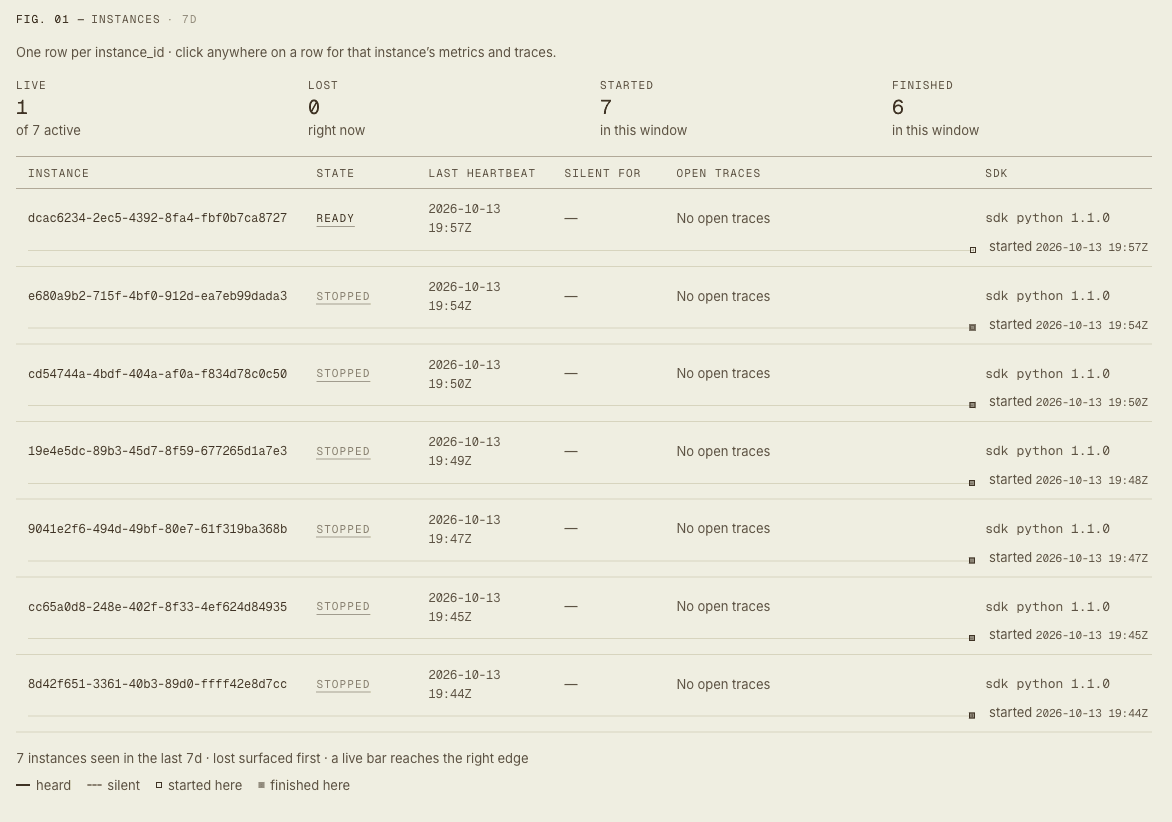
Instances are the live side of an agent. Every process with heartbeats on reports in regularly, and Rius lists it as one instance: a fresh instance ID per process start, so three replicas of the same agent show as three instances under one name. A long list shows the worst ten first, with a search by instance ID.
Status is computed server-side from the last heartbeat; the client is never trusted for it.
| Status | Meaning | When |
|---|---|---|
running | Alive and working | Recent heartbeat, at least one open trace |
ready | Alive and idle | Recent heartbeat, no open traces |
stale | Missing heartbeats | No heartbeat for 30s |
gone | Presumed dead | No heartbeat for 60s, and no final heartbeat |
stopped | Shut down | The process sent its final heartbeat before exiting |
The difference between stopped and gone is the one to watch. The SDKs
send the final heartbeat on a normal exit, and when you call shutdown().
An instance ends as gone when the process is killed (SIGTERM from a
deploy, SIGKILL, an out-of-memory kill) or exits with process.exit() or
os._exit(). Records age out a week after the last heartbeat, so a gone
instance stays visible long enough to investigate.
Heartbeats tell you whether a process is alive, not whether the agent is
stuck. A process that is hung but still sending heartbeats shows as
running.
If this section says “No heartbeat instances are reporting for this agent”, Rius is receiving traces but no heartbeats. The rest of the page still works. See Troubleshooting.
Context
Peak usage is how much of the model’s context window the largest call used. Use it to tell whether the agent is getting close to truncation.
Next to it, Rius breaks the prompt into buckets, such as the system prompt, tool definitions, tool calls and results, the tool-use preamble, user and assistant history, the current turn, and unattributed. Unattributed covers message framing, text the provider injects, and cached prefixes Rius can’t place. Each bucket is the estimated tokens summed over every LLM call in the window.
If you see “nothing attributed”, no LLM call in the window carried the data needed for the breakdown. Peak usage is still shown.
Versions
Versions shows which versions ran in the window, from
RIUS_MAIN_AGENT_VERSION (the agent definition) or RIUS_SERVICE_VERSION
(the build). If the agent reports no version, the page says so and tells you
which variable to set; see Set up.
With two or more versions, Compare puts a base version next to another, by default the two most recently introduced with the older as the base. It shows traces, failed rate, cost per trace, latency and time to first token (p50), and tokens per trace side by side, with the change. Tokens include prompt cache, as on Home. It warns when either side has fewer than 20 traces, since the difference can be noise. When traces carry both, switch between Agent version and Build.
Drift
Three charts show how the agent changes over time: TTFT p50, cost per trace, and failed rate. There is one point per minute, hour, or UTC day, depending on the window (per day at the 7d default), and each trace counts in the bucket it started in. Each chart lists its peak and low, and how many buckets are without a value.
Recent traces
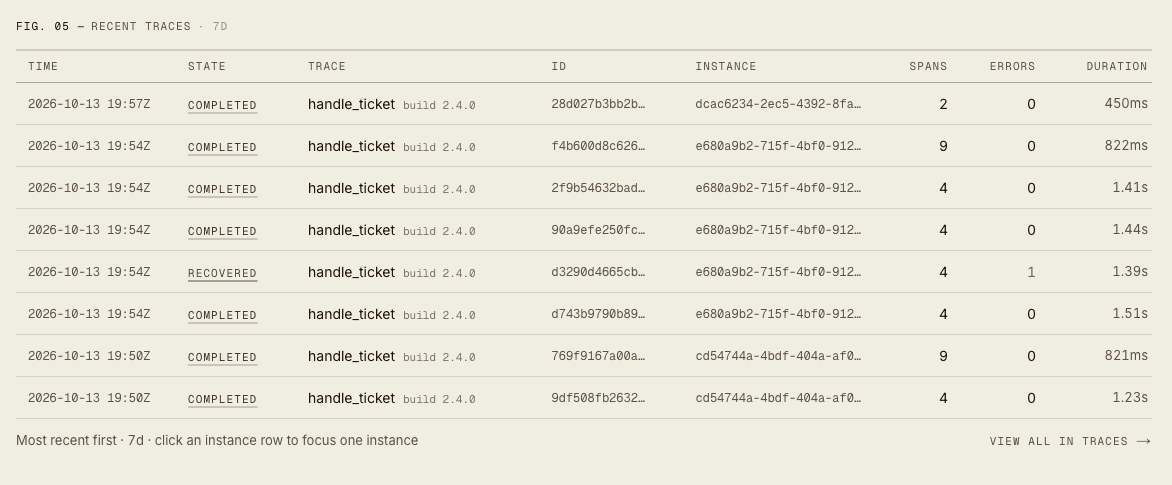
The agent’s latest traces, newest first, with state, trace name, ID, span count, errors, and duration. Click a trace to open it. View all in Traces opens the full list, filtered to this agent.
| State | Meaning |
|---|---|
| completed | Finished with no errored spans. |
| recovered | At least one span errored, but the run’s root finished cleanly. |
| failed | The run’s root span ended in error. |
| running… | Still running. |
| frozen? | Still running, but the instance running it has gone stale. |
Errored traces
The six newest traces with at least one errored span. That includes recovered and failed traces. View all in Traces opens the full list with the matching status filter.
Exceptions
Errored spans grouped by failure type, such as llm request failed or
downstream span failed. Each group shows when it last happened and how
many traces and spans it affected. Use it to tell whether many errors come
from one cause or from several. Click an instance chip to show only that
instance.
Lifecycle events
When each instance started, finished, went quiet, or came back in the window, newest first. It stays empty for agents without heartbeats.
Set up
Heartbeats are on by default in both SDKs, in Python since 0.10.0 and in TypeScript since 0.2.0. If you followed the Quickstart, your agent is already on this page. These settings fill in the rest:
Python
import rius

client = rius.init(
    api_key="ri_...",
    service_name="checkout-agent",
    agent_name="checkout-agent",
    heartbeat_interval=15,
)

# ... run your agent ...

client.shutdown()  # sends the final `stopped` heartbeat
A normal interpreter exit sends the final heartbeat too. The SDK installs no
signal handlers, so if your process is stopped with SIGTERM, call
client.shutdown() from your own handler.
Heartbeats need credentials: an API key (api_key in Python, apiKey in
TypeScript, or RIUS_API_KEY), or an Authorization entry in the client’s
headers (TypeScript since 1.8.0; one set only in
OTEL_EXPORTER_OTLP_HEADERS doesn’t count). A client without credentials, for example one that only sends through
your own exporter, sends no heartbeats.
| To get | Set |
|---|---|
| The right agent name | agent_name or RIUS_AGENT_NAME. Defaults to the service name. See Naming your agent. |
stopped instead of gone when the process is killed | Call shutdown() from your signal handler. |
| Fewer heartbeats | heartbeat_interval (RIUS_HEARTBEAT_INTERVAL), 5 to 300 seconds, default 15. Keep it at 15 or below: stale (30s) and gone (60s) are fixed by Rius, so a longer interval makes a live instance show as stale between heartbeats. |
| Versions and version comparison | RIUS_MAIN_AGENT_VERSION (the agent definition) and RIUS_SERVICE_VERSION (the build). |
| No heartbeats | heartbeat=False or RIUS_HEARTBEAT=false. Disabling the SDK (disabled=True) also stops them. |
To fill Versions and Drift, set the versions in the environment:
RIUS_MAIN_AGENT_VERSION=prompt-v12      # the agent definition: prompt, tools, policy
RIUS_SERVICE_VERSION=2026.09.29-a41f3c  # the build or deploy
Rius names an agent from the first of these that is set:
gen_ai.main_agent.nameon the resourcerius.main_agent.nameon the resourcegen_ai.agent.nameon the resourcegen_ai.agent.nameon the span- the service name (
service.name)
The SDKs set the main-agent keys for you. With a plain OpenTelemetry SDK,
set them as resource attributes, pairing gen_ai.main_agent.name with
gen_ai.main_agent.id. Heartbeats need the Rius SDK, so everything except
Instances and Lifecycle events works:
OTEL_RESOURCE_ATTRIBUTES=gen_ai.main_agent.id=checkout-agent,gen_ai.main_agent.name=checkout-agentrius.main_agent.name is still read, so a sender that already sets it
keeps its agent names.
A trace that arrives without a root span gets an inferred root, so it still counts toward the right agent.
Verify in one minute: start your agent, open Agents, and check
that it has an instance in running or ready. Let the process exit and
it moves to stopped. If it goes to stale and then gone instead, the
process was killed before it could send its final heartbeat.
Troubleshooting
My agent isn’t in the list. The process sends no agent name and no
service name of its own (OpenTelemetry’s unknown_service placeholder
doesn’t count). Set a service name or agent name, or set the resource
attribute if you use a plain OpenTelemetry SDK.
My run isn’t counted yet. The trace figures count only finished traces. A run appears in them once every span of it has ended; until then it is under Open traces and Recent traces.
“No heartbeat instances are reporting for this agent.” Traces are
arriving but heartbeats aren’t. The cause is one of: an SDK older than
Python 0.10.0 or TypeScript 0.2.0, RIUS_HEARTBEAT=false, an SDK started
without an API key or Authorization header, or traces coming from
something other than the Rius SDK.
Instances end as gone after every deploy. The deploy sends SIGTERM,
which skips the final heartbeat. Call shutdown() from your SIGTERM
handler.
TTFT is a dash, or only some calls are measured. TTFT only counts streaming LLM calls where the first token was recorded. The tile shows how many that is.
“This agent reports no version.” Set RIUS_MAIN_AGENT_VERSION or
RIUS_SERVICE_VERSION.
Next steps
- Users: the same traces, grouped by the end user each agent served.
- Exploring traces: follow a running instance’s open trace.
- Installation and configuration: every
initoption, including the heartbeat settings. - Claude Code plugin: trace your own
Claude Code sessions; each open session is a live instance of
claude-code. - Codex (beta) and Cursor (beta):
the same plugin for those agents. Open Codex sessions are live instances
of
codex; Cursor sends no heartbeat, so it has no instances. - MCP tool reference:
list_agents,agent_lifecycle_events,agent_error_groups,agent_versions, andcompare_agent_versionslet an agent query all of this itself.