Track LLM and agent cost
Rius prices every LLM span at ingest from the model and its token counts, including prompt-cache read and write tokens, so each call carries its own cost. It then rolls that cost up per trace, per agent, per end user, and per workspace, and you can alert on it or ask for it in plain language over MCP. You send the model name and token usage your instrumentation already records; you never send a price or a cost, and a cost attribute you do send is ignored.
How a call is priced
When a span reaches Rius, the ingest pipeline looks up its requested model
(gen_ai.request.model) in a price table and multiplies each token count by
its own rate. A span that carries only gen_ai.response.model is not
priced.
cost = uncached input tokens × input price
     + cache read tokens     × cache read price
     + cache write tokens    × cache write price
+ output tokens × output price- Prices come from LiteLLM’s public model-price catalog , fetched when the ingest service starts, so new spans follow current prices. All costs are in USD.
- Model names are normalized before the lookup, so the spellings
providers and gateways use resolve to the same price: a provider prefix
(
openai/gpt-4o), a dated snapshot (claude-sonnet-4-5-20250929), and the Amazon Bedrock and Google Vertex AI forms (us.anthropic.claude-sonnet-4-5-20250929-v1:0,claude-sonnet-4-5@20250929). - Cache tokens are priced at the provider’s cache rates. A model whose catalog entry has no separate cache rates is charged its input rate for them.
- Input tokens are read as the total prompt, including cached tokens, as in the OpenTelemetry GenAI conventions; the uncached share is that total minus the cache reads and writes.
- Token counts come from the
gen_ai.usage.*attributes, or their OpenInference and OpenLLMetry equivalents, which Rius normalizes at ingest. See attribute interoperability for the exact keys.
Costs are list-price estimates. Rius applies each model’s standard rates, not long-context tiers, batch, flex, or priority pricing, or any discount you negotiated, so expect your invoice to differ.
Cost is fixed on the span when it is written. A later price change does not rewrite past calls, and a call stored without a price stays unpriced even after the catalog adds its model.
When a model has no price
If the model is not in the catalog, or the span reported no token usage at all, Rius leaves its cost empty, not zero. A missing price and a free call are different facts, so an unpriced call never shows as $0. The span still gets its tokens, timings, and everything else.
Totals add up the calls that were priced, and averages per trace divide by
every trace, priced or not, so partial coverage lowers both. In the console,
a total with nothing priced in it shows a dash rather than $0; the summary
figures from the API and MCP tools such as agent_traces_summary report
that case as $0.00.
Where cost shows up
| Where | What you see |
|---|---|
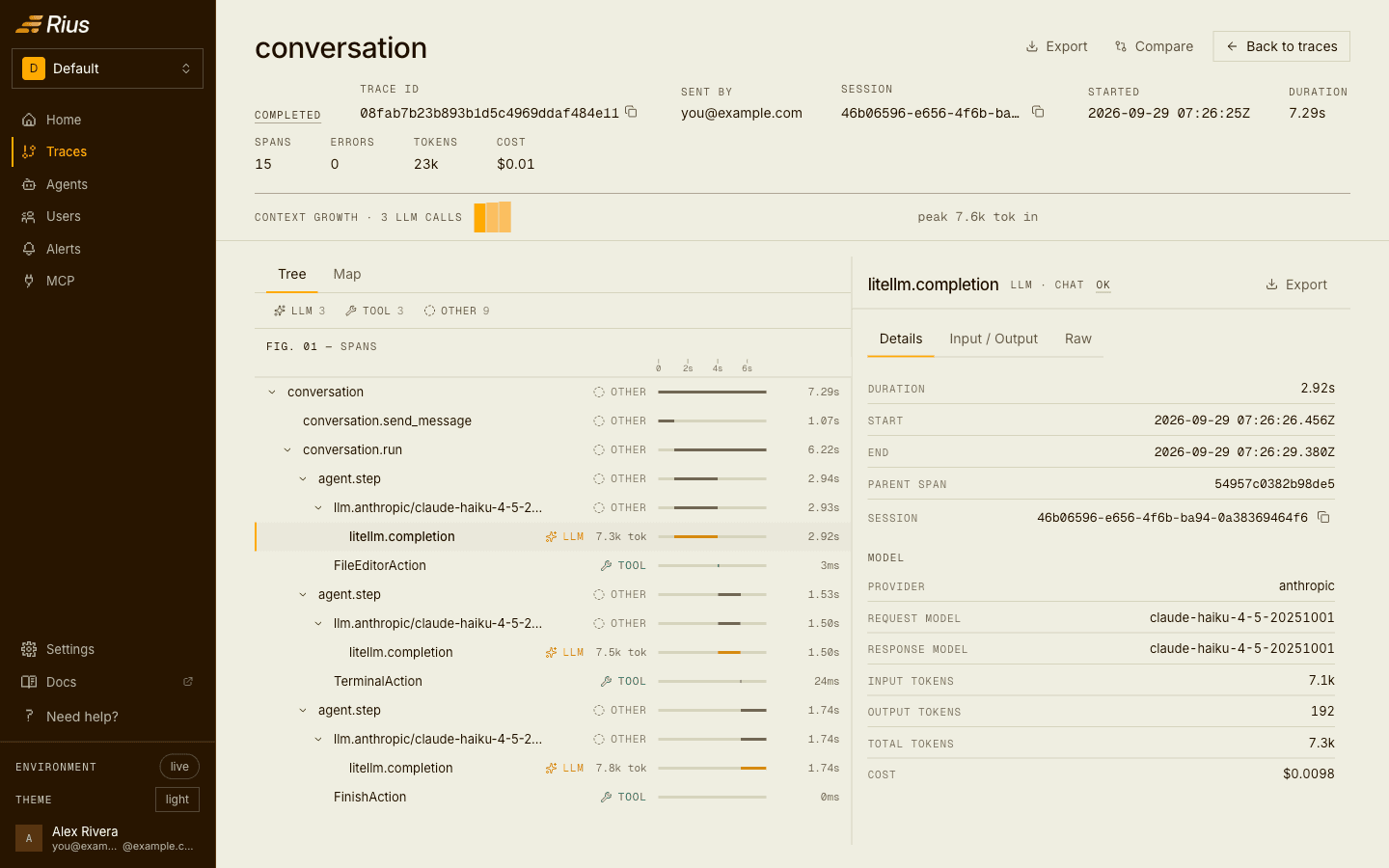
| Span detail | One LLM call: provider, model, input and output tokens, and its cost. |
| Traces | Cost per trace in the list, the summary strip, and the trace header, with a cost lens on the map view to see where the money went in one run. The Spans tab sorts individual calls by cost. |
| Agents | Total cost and average cost per trace for each agent, cost per trace over time in Drift, and cost per trace side by side in version Compare. |
| Users | Total cost and average cost per trace for each end user; sort by Cost to find your most expensive customers. |
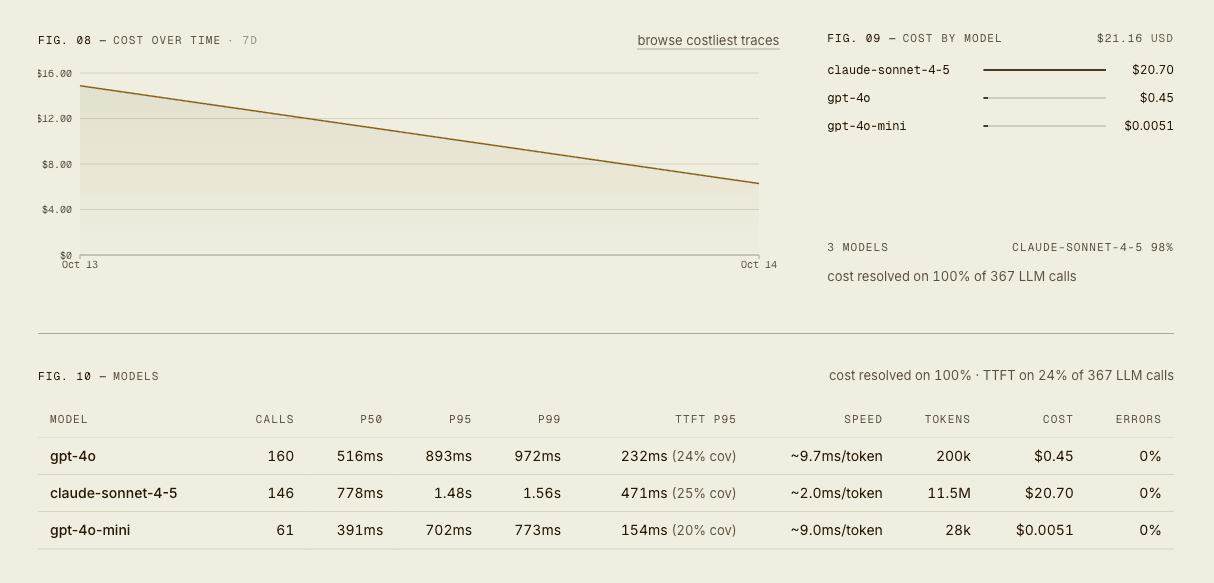
| Usage and cost | The workspace total for the period, with per-trace and per-1k-token averages, cost by model, and the change against the previous period. |
One LLM call opened in a trace, with its model, token counts, and cost in the span detail, and the trace’s total cost in the header:
An agent’s summary tiles, with its total cost for the window and the average per trace:

The cost charts on Home: cost over time, cost by model with how many LLM calls were priced, and the models table with calls, latency, tokens, and cost per model:
Two practical notes:
- Per customer. If you run one workspace per customer, the workspace
total is that customer’s cost; see
Multi-tenant observability.
Within one workspace, tag end users with
user.idand use Users. - Calls counted twice. Totals count each model call once, but a few instrumentation setups still record one call on two spans that both keep its usage. See Still counted twice.
Alert on cost
Cost is a metric in custom alerts. It is measured per trace, with avg, min, max, p50, p95, and p99 aggregations over a rolling window between 5 minutes and 24 hours, and you can scope it with filters such as service, agent, or model:
FILTERS   Service = checkout-agent
RULES     p95(Cost) > $2.00
WINDOW    1 hour
This catches runs that got expensive, such as a prompt that grew or an agent stuck retrying. A total-spend or budget threshold for the whole workspace is not an alert metric today; watch that on Usage and cost.
Cost alerts are only as complete as your pricing coverage. Firings on cost show the share of the window that was priced, so you can tell a high reading from a partly priced one. A rule over mostly unpriced models can stay quiet without firing, so check which models are priced in cost by model on Usage and cost.
Ask for cost over MCP
Connect the Rius MCP server to Claude, Cursor, or another MCP client and ask in plain language:
What did my agents cost this week, and which service is spending the most?
What do planner’s gpt-4o runs cost?
Who were my ten most expensive end users this week?
Tell me if p95 cost per trace goes over two dollars.
Behind those questions, the client calls workspace_metrics_overview for
the workspace total and cost by model, agent_traces_summary for one agent
or service (optionally per time bucket), list_users sorted by cost,
list_agent_traces and list_spans for the individual runs and calls, and
create_alert_rule to set up the cost alert. Full arguments are in the
tool reference, and more examples in
workflows.
Next steps
- Quickstart: send your first trace, with cost on every LLM call.
- Usage and cost: the workspace view of spend, tokens, and cost by model.
- Custom alerts: the full rule grammar for cost and the other metrics.