Claude Code plugin
The Rius plugin for Claude Code turns each Claude Code session into a trace in Rius. The trace holds your prompts, every model call with its tokens and cost, every tool call, and the subagents Claude Code started, laid out as a waterfall. The plugin also connects the Rius MCP server, so you can ask Claude about those sessions without leaving the terminal.
Setup takes four commands: two to install, one to sign in, and one to pick a folder to trace. The 5-minute walkthrough runs the whole loop.
By default the plugin sends full session content for the folders you enable, including the contents of files Claude Code reads and the output of commands it runs. Everyone with access to the workspace can read it. Read what gets captured before you enable a folder, or turn content capture off first.
Try it in 5 minutes
The whole loop, end to end. Each step links to the section with the details.
- Install. In a terminal, run
claude plugin marketplace add glassflow/rius-coding-agents && claude plugin install rius@rius-coding-agents. See Install to install from inside Claude Code instead. - Sign in. Run
/rius:login. In the browser, sign in (or sign up), pick a workspace or create one, and click Connect. See Sign in. - Turn tracing on.
cdinto a repo, then run/rius:enable-hereand/rius:status. The first line should readRius tracing: on. See Choose which folders are traced. - Work as usual. Ask Claude Code to do something real in that repo.
Then open the trace list at
console.rius-glassflow.comand find the session. See What you see in the console. - Ask about it. Reconnect
riusin/mcp, then ask Claude “list my recent Claude Code sessions in Rius”. See Query your sessions. - Turn it off for a folder. Run
/rius:disable-here. Nothing more from that folder reaches Rius; a session already running just closes its trace when it ends. See Disabling a folder mid-session. - Sign out. Run
/rius:logout. The key is revoked, and it stops working everywhere within about a minute. See Sign out.
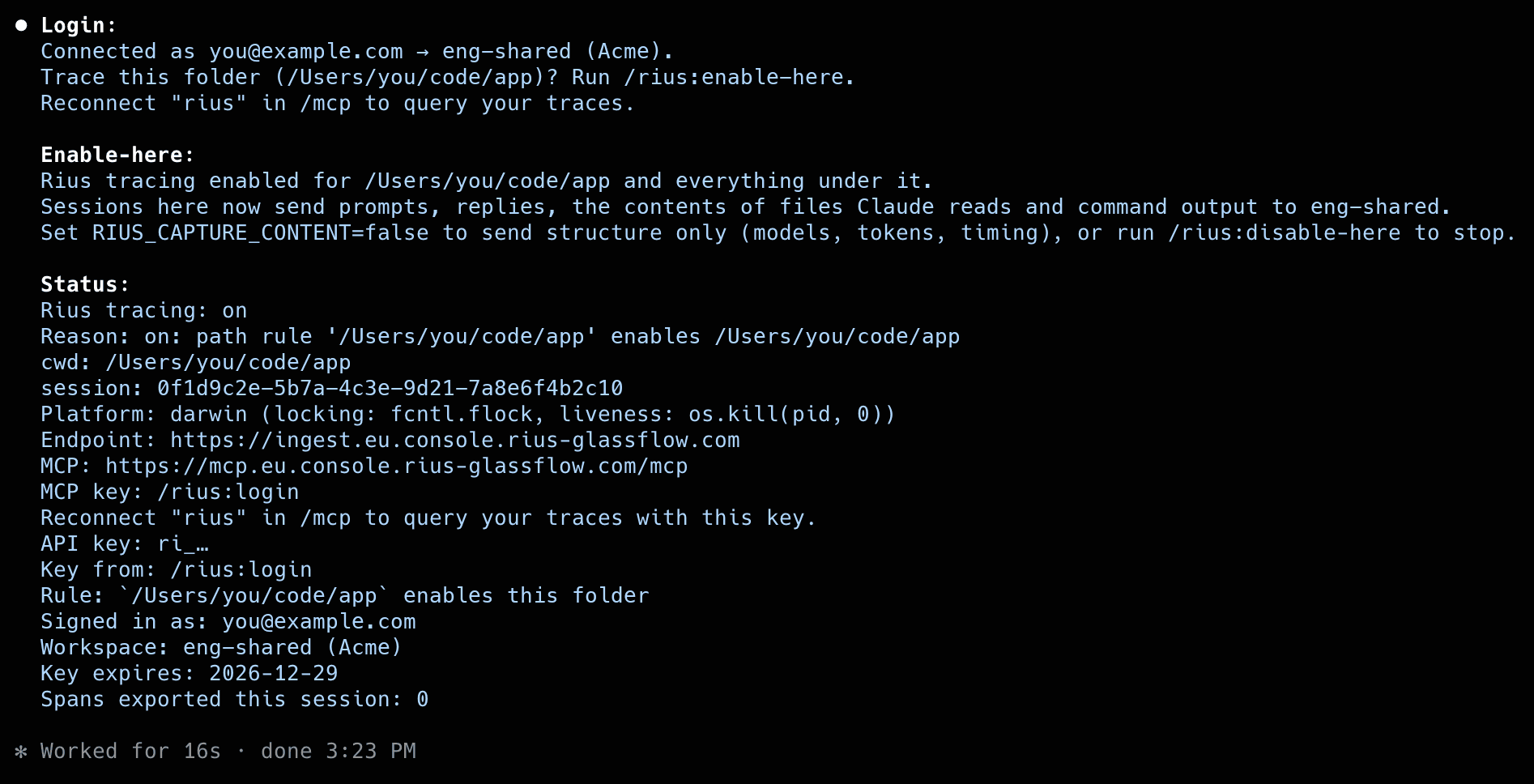
Steps 2 and 3 in a real terminal, signing in, enabling a folder, and checking the state:
Requirements
- Claude Code with plugin support.
- Python 3.9 or later on your
PATH. The plugin uses only the standard library and installs nothing from PyPI. - macOS, Linux, or Windows. On Windows the hooks run through Git Bash, which Claude Code already uses for its Bash tool.
You don’t need a Rius account yet. You can sign up during /rius:login.
Install
Run this in a terminal:
claude plugin marketplace add glassflow/rius-coding-agents && claude plugin install rius@rius-coding-agentsOr install from inside Claude Code. Run the two commands one at a time: pasting both together fails, because Claude Code reads the whole paste as one command.
-
Add the marketplace:
/plugin marketplace add glassflow/rius-coding-agents -
Install the plugin:
/plugin install rius@rius-coding-agents -
Load it into the running session:
/reload-plugins
Installing sends nothing. Tracing stays off for every folder until you enable one.
Sign in
/rius:loginClaude Code repeats the content warning above, prints a link and a short
code, and opens the Rius portal at console.rius-glassflow.com in your
browser:
- Sign in, or sign up if you don’t have an account yet.
- Check that the page shows the same code, and the name of the machine
you ran the command on. The page reads Claude Code on
<machine>wants to connect. Only continue if you just ran/rius:loginyourself. - Choose the workspace this machine sends sessions to. It can be a workspace you own, or one you are only a member of.
- Click Connect. The text above the button spells out what you are granting: Claude Code can send sessions to that workspace and read all traces in it.
Back in Claude Code, the plugin reports where it landed:
Connected as you@example.com → eng-shared (Acme).
Trace this folder (/Users/you/code/app)? Run /rius:enable-here.
Reconnect "rius" in /mcp to query your traces.
The sign-in link expires after 15 minutes. If it does, run /rius:login
again.
The key the plugin stores
Signing in mints one API key for this machine and the workspace you chose:
- It carries the
ingestandreadscopes, so one key both sends traces and queries them over MCP. - It expires after 90 days. Run
/rius:loginagain to get a new one. - It is stored in
~/.claude/rius/credentials.json, readable only by you (mode 0600). It never goes into Claude Code’s settings files, which tend to get committed and shared. - It is listed under Settings → API keys in the console as
Claude Code: <your email> (<machine>). A workspace admin can revoke it there like any other key.
Running /rius:login again replaces the key and revokes the old one. If you
pick a different workspace the second time, every folder you have enabled
sends to the new workspace from then on, and the plugin says so.
Traces sent with this key show you in the Sent by column of the trace list, so teammates sharing a workspace can tell whose sessions are whose.
Choose which folders are traced
Tracing is off everywhere until you turn it on for a folder. In the folder you want traced:
/rius:enable-hereThat folder and everything under it is traced. A session that is already open when you enable its folder is traced from its start: everything said earlier in that session is sent too, with content unless capture is off. To trace only from now on, start a new session after enabling. To stop tracing a folder, including one inside an enabled parent:
/rius:disable-hereThe rules live in ~/.claude/rius/config.json and apply to every Claude
Code session on the machine. A disabled folder always wins, at any depth:
you can enable ~/code and still keep ~/code/client-secrets out. The
reverse doesn’t work. Enabling a folder inside a disabled one leaves it off,
and the plugin tells you which folder to enable instead.
Disabling a folder mid-session
If you run /rius:disable-here while a traced session is open, nothing that
happens after that point is sent. When the session ends, the plugin still
closes its trace, sending only the structure of what was open (no prompts,
replies, or tool content), so the trace is complete and counts on the
Agents and Users pages. The stop is final for that session: enabling the
folder again doesn’t resume it. The next session in the folder follows the
folder rules as usual. /rius:status shows a Stopped: line for a session in
this state.
For a one-off exception that doesn’t touch the folder rules, /rius:off
stops tracing for the current session only. Like disabling the folder, it
is final once the session’s trace has started: /rius:on only helps if you
ran /rius:off before the first prompt. A new session starts without the
override.
Check the state
/rius:status/rius:status shows whether this folder is traced and which rule decided
it, along with the account, the workspace, and how many spans this session
has sent so far:
Rius tracing: on
Reason: on: path rule '/Users/you/code/app' enables /Users/you/code/app
cwd: /Users/you/code/app
session: 0f1d9c2e-…
Platform: darwin (locking: fcntl.flock, liveness: os.kill(pid, 0))
Endpoint: https://ingest.eu.console.rius-glassflow.com
MCP: https://mcp.eu.console.rius-glassflow.com/mcp
MCP key: /rius:login
Reconnect "rius" in /mcp to query your traces with this key.
API key: ri_…
Key from: /rius:login
Rule: `/Users/you/code/app` enables this folder
Signed in as: you@example.com
Workspace: eng-shared (Acme)
Key expires: 2026-12-29
Spans exported this session: 12
If you disabled this folder earlier in the session, the first line reads
Rius tracing: off and a Stopped: line follows Reason; see
Disabling a folder mid-session.
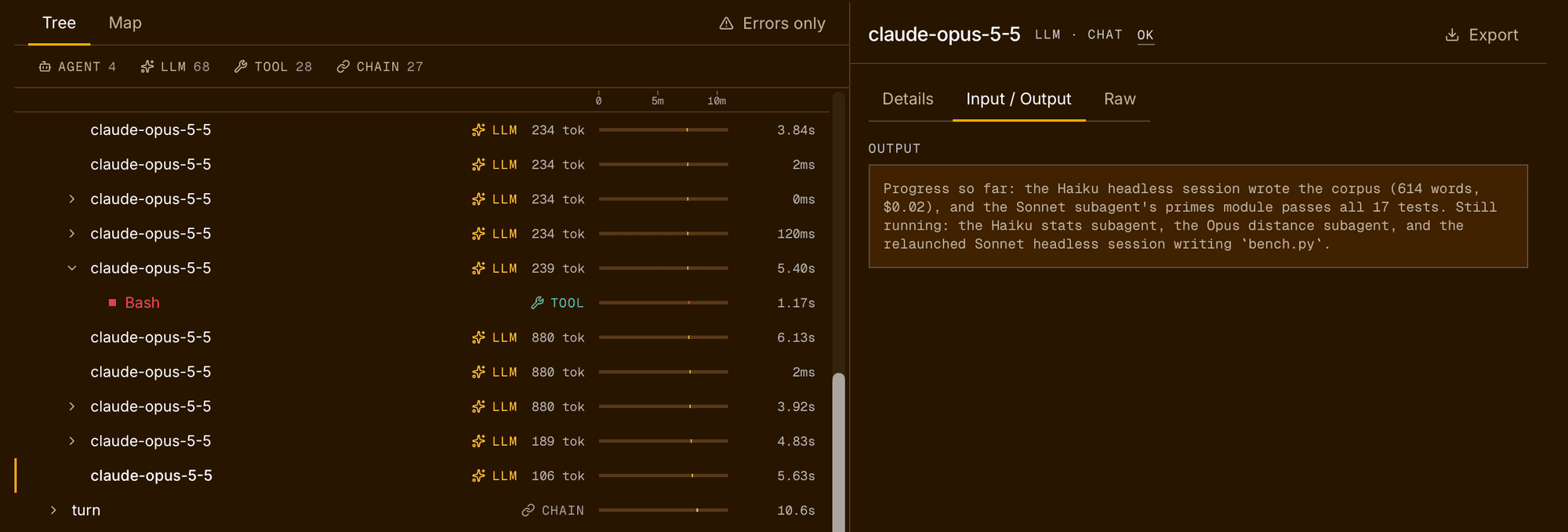
Send a prompt or two, then open the trace list in the console. The session’s spans show up there while it is still running. The counts on other pages wait for the session to end; see What you see in the console.
What you see in the console
- Traces. Each session appears in the
trace list while it runs, and its
spans fill in as Claude Code works. The session itself shows as in
progress until you exit Claude Code, which closes it. From plugin 0.4.3,
the trace is named after the session: the name you gave it with
/renameor--name, or else the title Claude Code generates from your first prompt. Rename a session while it runs and the trace name follows. Earlier versions, and every session with content capture off, name the traceclaude-code session. - Agents. While a session is open, the Agents
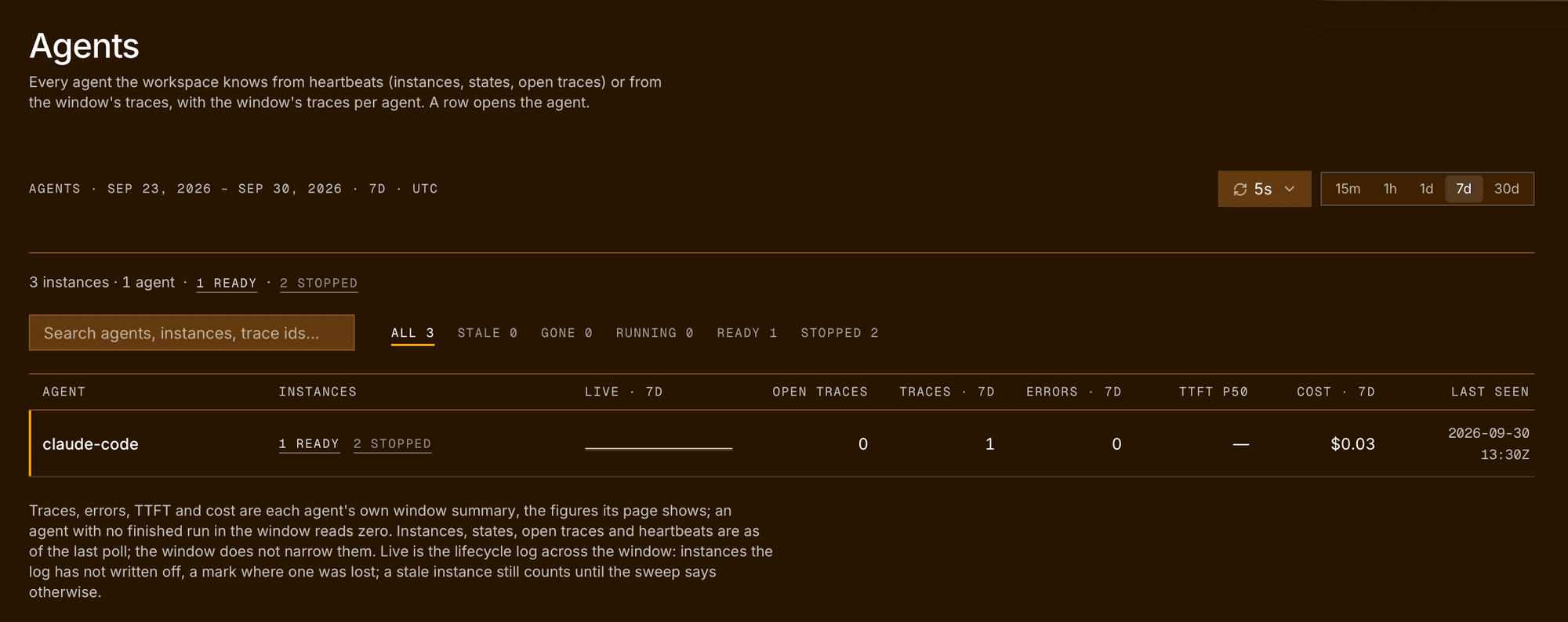
page shows it as a live instance of an agent named
claude-code(or yourRIUS_SERVICE_NAME), from the plugin’s heartbeat. The agent’s trace, error, and cost figures only count a session once it has ended. A session that never ends cleanly, because Claude Code crashed or was killed, never counts there. A session started before its folder was enabled sends no heartbeat, so it doesn’t appear under Instances. A session whose folder you disabled while it was running still counts once it ends: see disabling mid-session. - Users. The plugin doesn’t set an end user, so its sessions land in the anonymous row of the Users page. To see who ran a session, use the Sent by column in the trace list, which names the owner of the key.
What gets captured
One Claude Code session is one trace, with the same session id throughout. If you resume a session, it continues the same trace.
AGENT   the session
└─ CHAIN  a turn: one prompt and everything it caused
   └─ LLM   a model call: model, input and output tokens, cache reads
      ├─ TOOL  a tool call: Bash, Read, Edit, and so on
      └─ TOOL  Agent: the call that started a subagent
         └─ AGENT  the subagent, named by its type
            └─ LLM   the subagent's own model calls and tools
Subagents get their own spans with their own tokens. That matters on cost: in long sessions, subagents can account for more than half of all tokens. Turns that Claude Code injected itself, such as a slash command’s output or a background task’s report, are kept but marked as system turns, so you can tell them apart from what you typed.
| Captured | With content capture on (default) | With content capture off |
|---|---|---|
| Span tree, timing, status | ✓ | ✓ |
| Model names, tokens, cache reads, cost | ✓ | ✓ |
| Tool names and subagent types | ✓ | ✓ |
| Your prompts and Claude’s replies | ✓ | ✗ |
| The session’s name, as the trace name (0.4.3 and later) | ✓ | ✗ |
| Tool inputs, such as commands and file paths | ✓ | ✗ |
| Tool outputs, such as file contents and command output | ✓ | ✗ |
| Error details of a failed tool call | ✓ | ✗ |
With content on, each captured value is capped at 32 KB and marked where it was cut, so one large file read doesn’t break the export.
Content capture is decided on your machine, before anything is sent. The
plugin contacts three hosts and nothing else: the ingest endpoint
ingest.eu.console.rius-glassflow.com, the MCP server
mcp.eu.console.rius-glassflow.com, and the sign-in host
connect.console.rius-glassflow.com, which /rius:login and
/rius:logout use.
Model-call durations are approximate. Claude Code’s transcript records when a reply finished but not when the request went out, so a model span’s duration can include time you spent reading or approving a permission prompt. Tool durations are exact.
Turn content capture off
Set RIUS_CAPTURE_CONTENT to false in the env block of a Claude Code
settings file. For every project on the machine, use
~/.claude/settings.json:
{
  "env": {
    "RIUS_CAPTURE_CONTENT": "false"
  }
}
For one project only, put the same block in that project’s
.claude/settings.local.json. Restart Claude Code after the change. You
keep the full structure, models, tokens, cost, and timing, and lose the
text of prompts, replies, and tool inputs and outputs.
Turning capture off applies to what is sent from then on. Traces already in the workspace keep their content.
Query your sessions from Claude Code
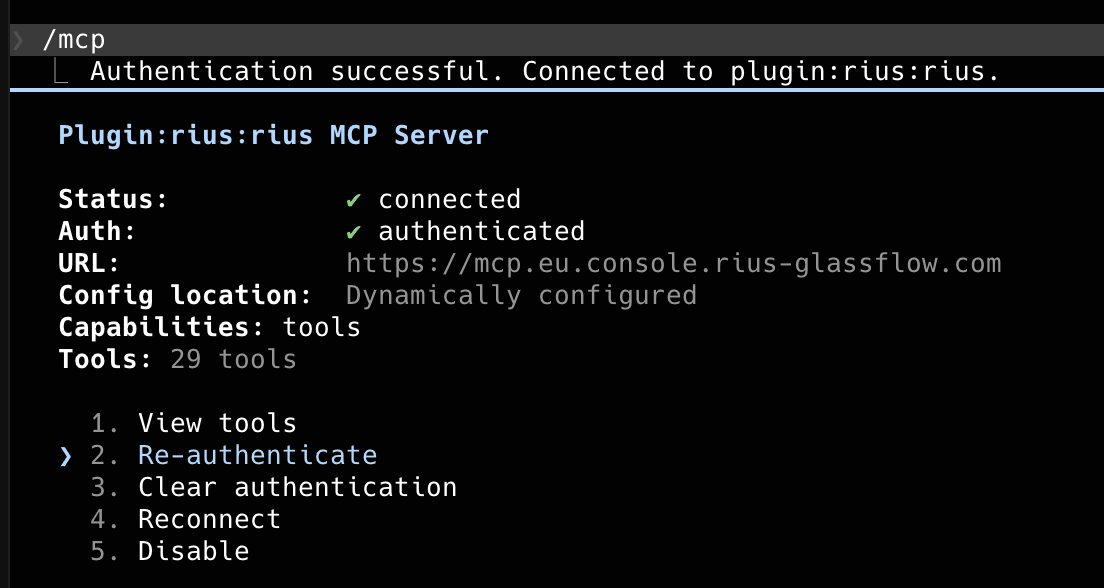
The plugin brings the Rius MCP server with it, registered as rius and
pointed at https://mcp.eu.console.rius-glassflow.com/mcp. It signs in with
the key /rius:login stored, so there is no second login. After
/rius:login, reconnect rius in /mcp, or restart Claude Code. If you
set RIUS_API_KEY instead of signing in, see
Use an existing API key.
Then ask in plain language:
- “Which of my Claude Code sessions in the last 24 hours cost the most, and what did the tokens go on?”
- “Show me my last failed session and which tool call went wrong.”
- “How much did subagents cost me this week compared with the main session?”
The tools reference lists everything the server can
answer. If you already added the server by hand from the MCP page
as glassflow, both entries work; remove one in /mcp if you only want one.
Sign out
/rius:logoutThis revokes the key on the server and then deletes it from your machine. Rius services cache keys briefly, so a revoked key keeps working for up to about a minute. If Rius can’t be reached, the plugin still signs you out locally and tells you the key stays valid until it expires. Ask a workspace admin to revoke it under Settings → API keys.
Signing out doesn’t delete traces already sent, and doesn’t remove your folder rules. With no key, tracing is off everywhere.
Signing out while a session is running removes the key that session was using, so the plugin can’t close its trace when it ends. That session stays in the trace list as in progress, and never counts on the Agents or Users pages.
To remove the plugin:
/plugin uninstall riusFolder rules, logs, and the stored key live in ~/.claude/rius/ and survive
an uninstall. Delete that directory for a clean slate:
rm -rf ~/.claude/rius/Use an existing API key
If you would rather manage the key yourself, for example on a machine
without a browser, set RIUS_API_KEY instead of running /rius:login.
Create the key under Settings → API keys with Send telemetry
(ingest). Put it in the project’s .claude/settings.local.json, which is
usually gitignored:
{
  "env": {
    "RIUS_API_KEY": "ri_..."
  }
}
RIUS_API_KEY wins over a key stored by /rius:login for tracing, and
/rius:status says which one is in use on its Key from: line.
RIUS_API_KEY covers tracing only. Claude Code does not pass environment
variables whose names look like credentials to a plugin’s MCP servers, so
the bundled rius server never sees it. To query your traces from Claude
Code, either run /rius:login as well, or add the MCP server yourself
under its own name, glassflow, with a key that carries Query data
(read), as on the MCP page:
claude mcp add --transport http glassflow https://mcp.eu.console.rius-glassflow.com/mcp \
  --header "Authorization: Bearer ri_..."
Query through glassflow. The bundled rius entry keeps answering 401
without a /rius:login key; you can disable it in /mcp.
Other settings, all optional and set the same way:
| Variable | Default | What it does |
|---|---|---|
RIUS_CAPTURE_CONTENT | true | false sends structure only. See above. |
RIUS_SERVICE_NAME | claude-code | The service name on every trace. |
RIUS_CLAUDE_MAX_ATTR_BYTES | 32768 | The size cap for each captured value. |
RIUS_CLAUDE_DEBUG | false | Verbose logs in ~/.claude/rius/log/. |
Troubleshooting
Start with /rius:status. A plugin that is installed but not enabled for
this folder looks the same from the outside as a broken one, and the
Reason line tells them apart:
Reason line | What to do |
|---|---|
off: no path rule matches <folder>, and the default is off | Run /rius:enable-here in this folder. |
off: no API key: run `/rius:login` (or set RIUS_API_KEY) | The folder is enabled but there is no key. Run /rius:login, or set RIUS_API_KEY. |
off: session override | You ran /rius:off in this session. If the session had already started tracing, it stays off; start a new session. |
on: path rule '<rule>' enables <folder> | Tracing is working, unless a Stopped: line follows (see below). |
When tracing is off for another reason and there is no key either, the
line names both, for example
off: no path rule matches <folder>, and the default is off; also no API key: run `/rius:login` (or set RIUS_API_KEY).
Fix both before expecting traces.
A Stopped: line under Reason means tracing was turned off for this
session while it was running: a folder disable, /rius:off, or
RIUS_CLAUDE_ENABLED=false. That session sends nothing more, even if the folder is
enabled again, and Rius tracing reads off for it whatever the rules say.
Its trace is still closed when it ends. Start a new session to trace again.
The line reads:
Stopped: this session stopped tracing when its folder was disabled, and stays stopped even if the folder is enabled again. New sessions in this folder are traced as usual.If tracing is on but Spans exported this session stays at 0, look for a
Last export error line in the same output:
- HTTP 401 right after signing in. A new key can take up to about 30 seconds to reach the ingest endpoint. Send another prompt after a short wait.
- HTTP 401 or 403 later on. The key was revoked or has expired. Run
/rius:loginagain. - The MCP server answers with 401 right after
/rius:login. Reconnectriusin/mcp, so it picks up the new key. - The MCP server answers with 401 and you use
RIUS_API_KEY. Claude Code doesn’t pass that variable to the bundled server, and/rius:statussays so:MCP key: none. Claude Code does not pass RIUS_API_KEY to the bundled MCP server; run /rius:login to query your traces.Run/rius:login, or add the server yourself as shown in Use an existing API key.
If the plugin seems not to change after an update, Claude Code is still running its cached copy. Refresh it, one command at a time:
/plugin marketplace update rius-coding-agents/reload-pluginsIf the plugin can’t find a Python interpreter, /rius:status says so and
names the ones it tried: Rius: no Python interpreter found on PATH. For
the tracing hooks, ~/.claude/rius/log/bootstrap.log records the same.