Concepts
Everything in Tares hangs off one pipeline. Sources ingest events from your systems; the labels on each event say which entity it belongs to. A read returns one entity’s events across sources, merged in time order. A trigger watches a set of sources and, when its condition trips, emits a dispatch that wakes agents; an agent can write a finding back onto the entity’s timeline. A project is a goal plus its wiring: which trigger wakes which agent, over sources, triggers, agents, MCP servers and skills that any number of projects can share.
connector → source → event → labels → entity
                          ├→ read  (on demand; agents + console)
                          └→ trigger → dispatch → agents woken  (project wiring; webhook subscriptions)
                                                  └→ finding  (written back)

project = a goal + its wiring (which trigger wakes which agent, who hands off to whom)
          over parts shared on the instance: sources, triggers, agents, MCP servers, skills
The rest of this page defines each term, starting with the project and then in the order the data flows.
Projects
A project is the unit you set up and look after: one job, such as “diagnose alerts on the checkout service” or “keep the shared code context current”, with everything it needs on one page. Sources, triggers, agents, MCP servers and skills belong to the instance, and any number of projects can use the same one: two projects can watch the same logs, or share one agent, without copying anything. What a project holds is its goal and its wiring: which trigger wakes which agent in it, whether that agent is on there, and who hands off to whom. A run belongs to the project whose wiring started it.
Every instance has a Default project. It holds whatever was made outside another project (an
API call or MCP tool that leaves project out lands there) and any part no project uses any more.
When another project takes in a part, the part leaves Default. The Default project is listed first
and cannot be deleted.
A project’s page shows the activity of everything it uses. See Projects for how to start one and what its page shows, and All resources in the console for every part on the instance with the projects that use it.
Sources
A source is a configured connector instance. It has a name, a connector type, and a config object. Each source produces a single stream of events.
Sources have one of three modes:
- Poll:
taresdfetches from the upstream on an interval (poll, e.g.5s,1m). Used by GitHub, Prometheus, Postgres, Docker logs. - Push: producers send events to
taresdover HTTP. Used by Vercel, OTLP, Alertmanager, and webhooks. A push source has a generatedingest_key; producers POST to/ingest/<ingest_key>(OTLP uses/v1/{logs,traces,metrics}). - Reference: declarative context, not a stream. The config is the data; it’s re-materialized
on edit and always surfaced regardless of the read window. Used by
reference.
Sources are added, edited, paused, and removed at runtime; no restart is required. A new source joins the project it is created in (the Default project when none is named) and can be added to more projects later. A project that takes in a trigger takes in the sources it reads too.
Events
Every event is stored with the same fields:
| field | type | description |
|---|---|---|
source | string | the source that produced the event |
event_time | timestamp | when the event occurred (source time if available, else ingest time) |
event_type | string | a coarse type, e.g. commit, 5xx_rate, error |
text | string | the rendered line an agent reads |
fields | object | typed values extracted for filtering and triggers, e.g. { "status": 500 } |
labels | object | named correlation axes, e.g. { "service": "checkout" } |
payload | object | the original event, unmodified (lossless) |
key_value | string | the value of the primary label (the key) |
Labels, keys, and entities
A label is a named axis carried by an event. It is declared on the source as one of:
const: a fixed value applied to every event from the source, orfield: read per-event from a field in the connector’s normalized event.
Example label declarations on a source:
labels:
  - { name: service, field: service, primary: true }
  - { name: env, const: prod }
The label marked primary: true is the key: key_value is set from it. If no label is marked
primary, the connector’s default key is used.
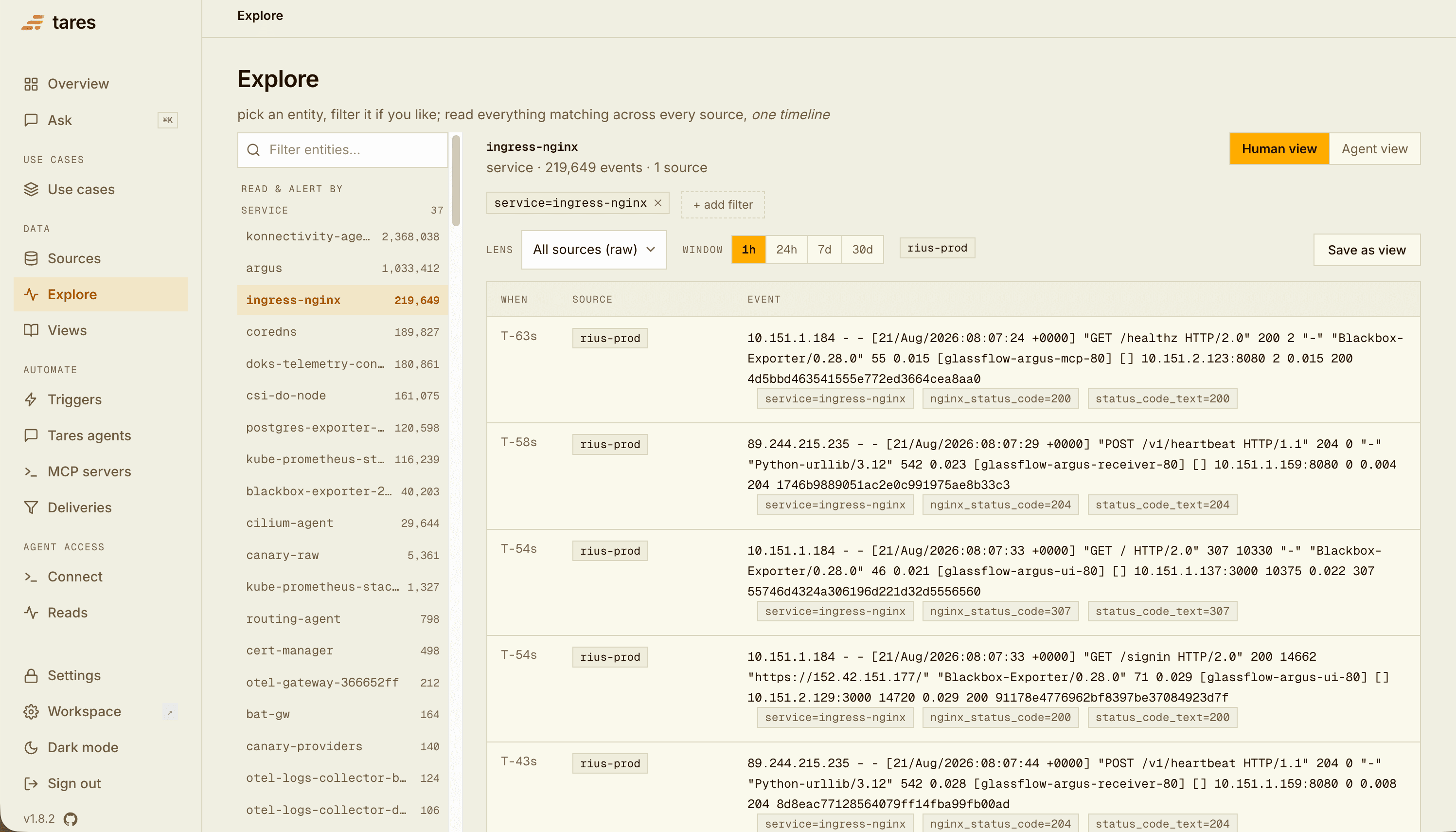
An entity is a (label, value) pair, e.g. (service, checkout) or (repo, acme/api). The
console’s Explore page lets you pick any entity and read its correlated timeline; it lists each
label’s distinct values with event counts. Because labels are indexed, selecting events by
{ service: "checkout" } is a lookup, not a text scan.
A source’s Fields tab (console, or GET /api/sources/<name>/fields) reports each label/field’s
coverage (how many sampled events actually carry it) and its top values. Use it to choose a key
that is reliably present.
Reading
The core read is read(selector, window): a correlated, time-ordered timeline of every event
matching a { label: value } selector, in one response. The selector is a strict-AND conjunction,
so { service: "checkout" } returns that service’s logs, metrics, and deploys merged on one clock,
and adding a label narrows it. Each row carries the labels it matched on, so a read is
self-describing.
A read covers every source by default. Name a project to read only that project’s sources (and
the findings recorded in that project), or sources to read only the ones you list (both together: the named ones within the project).
Explore offers the same choice as a project picker. A Tares agent reads the
sources of the projects its run is for unless it names others.
The reference source type
Most sources are time-series: a read applies the window, so old events age out. A
reference source is different: it holds declarative context
(documents attached to an entity by their labels), and its events are always included in an
entity read, regardless of the window. A runbook or schema attached to service=checkout
surfaces on every read of that entity, not just recent ones, so an agent correlating on an entity
always has its reference material to hand.
Triggers and subscriptions
A trigger watches a set of sources and evaluates a condition as events arrive. It is defined by:
sources: the sources it watches (at least one),filters: optional[{ field, op, value }]that narrow which events count (ops:eq,neq,contains,gt,lt,gte,lte),key_field: optional, the label that identifies the entity across those sources (default: the primary label of the first source),condition: an aggregate of a field, grouped by entity, compared to a threshold over a window, for examplemax(rate_5xx) > 1.0per entity over1m. A schedule trigger fires every interval instead (condition: {every: 10m}).
When the condition holds, the trigger emits a dispatch: one firing for one entity, carrying the entity’s timeline across the trigger’s sources. Every dispatch is logged, even when nothing is woken; firings and delivery status are on the trigger’s page and in the project’s Activity.
Two kinds of agent are woken by a dispatch:
- A Tares agent (a prompt configured in Tares that runs in-process) is woken through a project’s wiring: each project that uses the agent says which trigger wakes it there and whether it is on. An agent can use any MCP server on the instance, and can have no trigger at all, so that only a handoff from another agent starts it.
- An external agent subscribes: a webhook URL that gets POSTed the timeline (see the delivery contract). An outside agent can also join a whole project.
See Watch with triggers for the full shape.
Findings
A finding is a conclusion written back onto an entity’s timeline. When a Tares agent runs on a dispatch, it reads the correlated timeline and writes its diagnosis as an event in a findings source (auto-provisioned on first use), labeled with the same axis as the evidence. Because it is a labeled event like any other, every later read of that entity includes it: the next agent (or human) to look starts from the previous conclusion instead of from scratch.
External agents write back the same way with the remember tool, which
stores observations in the agent-memory source.
Runs and lineage
Each time a Tares agent runs, Tares records a run: its status, rounds, cost, finding, and what
woke it (woken_by: trigger, schedule, manual, rerun, bootstrap, handoff or practice, the
last for Run it once now; a
finding an outside agent records is kept as a run with
woken_by: external). A rerun
points at the run it repeats, a handed-off run at
the run that handed off, and a firing tripped by a finding at the run that wrote it. This
lineage lets the project’s Activity show an alert, the finding it
led to and the next agent’s root cause as one thread.
Skills
A skill is a named set of instructions, such as a runbook or a house style. Skills live on the
instance, and projects use them: an agent sees the name and description of each skill of the
projects its run is for, and loads the full text with the skill tool when a task matches. See Skills.
The catalog
The catalog is the set of configured sources, triggers, agents, MCP servers, projects and
skills. It is stored in the embedded database and is also expressible as YAML:
GET /api/catalog/export returns it, and importing YAML (or seeding from a file on first boot)
recreates it. Each trigger, agent and MCP server names the project that made it, and each source
the projects it is in, by name, so a file imports into another instance. A wiring: section
holds each project’s wiring: which trigger wakes which agent there, on or off, and its handoffs. The MCP catalog_describe
tool (and, in the console, a source’s detail page) reports any object’s schema (event types and
inferred typed fields), the entities it carries, freshness, lineage, and sample events.
See Connectors for what can be ingested, and Connecting agents for the read/watch surface.
Deleting
Objects depend on each other downward: a trigger on its sources, a Tares agent on its trigger.
Deleting a source shows the triggers and agents that need it and offers to delete those too, in
order (agents, then triggers); say no and the delete is refused, naming what would break. Deleting
a trigger leaves the agents it woke in place, without a trigger of their own. Deleting a part
removes it from every project that used it. Deleting a project deletes the triggers, agents, MCP
servers and skills it made, keeps any part another project uses, and lets you pick which of its
sources go too (see Deleting a project). On the API:
GET /api/catalog/dependents?kind=source&name= lists the dependents, and cascade=true on
DELETE /api/sources/{name} takes them along.