Tares agents
A Tares agent is a prompt attached to a trigger. When the trigger fires, the agent is handed the correlated timeline for the affected entity, reads it (and can read a wider window or another entity), and writes its conclusion back into Tares as a finding on that entity’s timeline.
It’s a real agent (it reasons with an LLM), configured inside Tares. That distinguishes it from a connected agent, an external agent you wire up over MCP or a webhook, which lives in your own infrastructure. Both kinds are woken by the same trigger; what a Tares agent may do is deliberately narrower (the boundary).
Because a finding is also stored as an event on the entity’s timeline, the next agent to read that
entity (including your own connected agent) receives prior Tares conclusions as part of the
evidence. Tares doesn’t replace your agent; it gives it a head start.
Create one
In the console, open a trigger and choose Add a Tares agent (or go to Tares agents → Create Tares agent). You supply the prompt, optionally seeded from a preset, and may pin a model from the dropdown; everything else is fixed (see runtime and guardrails).
A Tares agent is enabled exactly when it is subscribed to its trigger, the same wiring an external subscriber has. New agents start disabled; enable it to run on the next firing. It is listed under Tares agents, on its trigger’s page, and on Deliveries wherever it was woken.
In the catalog
An agent is a catalog object, so it exports/imports with everything else and can be shipped in a seed catalog:
Optional fields: model (a claude model id; omit to follow the instance default),
slack_channel (a channel ID the workspace bot posts to), webhook_url / webhook_token
(the write-back webhook; the token, like slack_webhook,
exports only with secrets included), and mcp_servers (names from the
MCP servers registry this agent may use). The registry itself is a catalog
object too: a top-level mcp_servers: list of {name, url, auth_header, auth_value}, with
auth_value secret-gated on export.
agents:
  - name: incident-first-look
    trigger: incident            # the trigger that wakes it
    enabled: true                # enabled ⟺ subscribed to the trigger
    prompt: |
      You are an SRE taking the first look when an alert fires on this service. You are handed the
      correlated timeline: the firing alert plus the signals behind it and the request logs.
      Produce a tight incident note: what is failing and since when, the most likely cause tied to
      specific evidence lines, and a suggested next action. Do not speculate beyond the evidence.
The bundled demo ships exactly this agent, so tares up closes the loop with
nothing to deploy.
Watch it run
Fire the agent’s trigger (in the demo: inject a fault) and follow it:
- The firing is on the trigger’s page and under Deliveries.
- The run (status, rounds, duration, errors) is under the agent’s page → Runs & findings. A
run that concludes “inconclusive” or fails is recorded here and never pollutes a timeline.
The list can be filtered to successful or failed runs only, and Show more pages past the
first fifty (
GET /api/agents/builtin/{name}/runs?status=ok&offset=50). - The finding appears in Explore on the entity’s timeline, alongside the evidence it was drawn from.
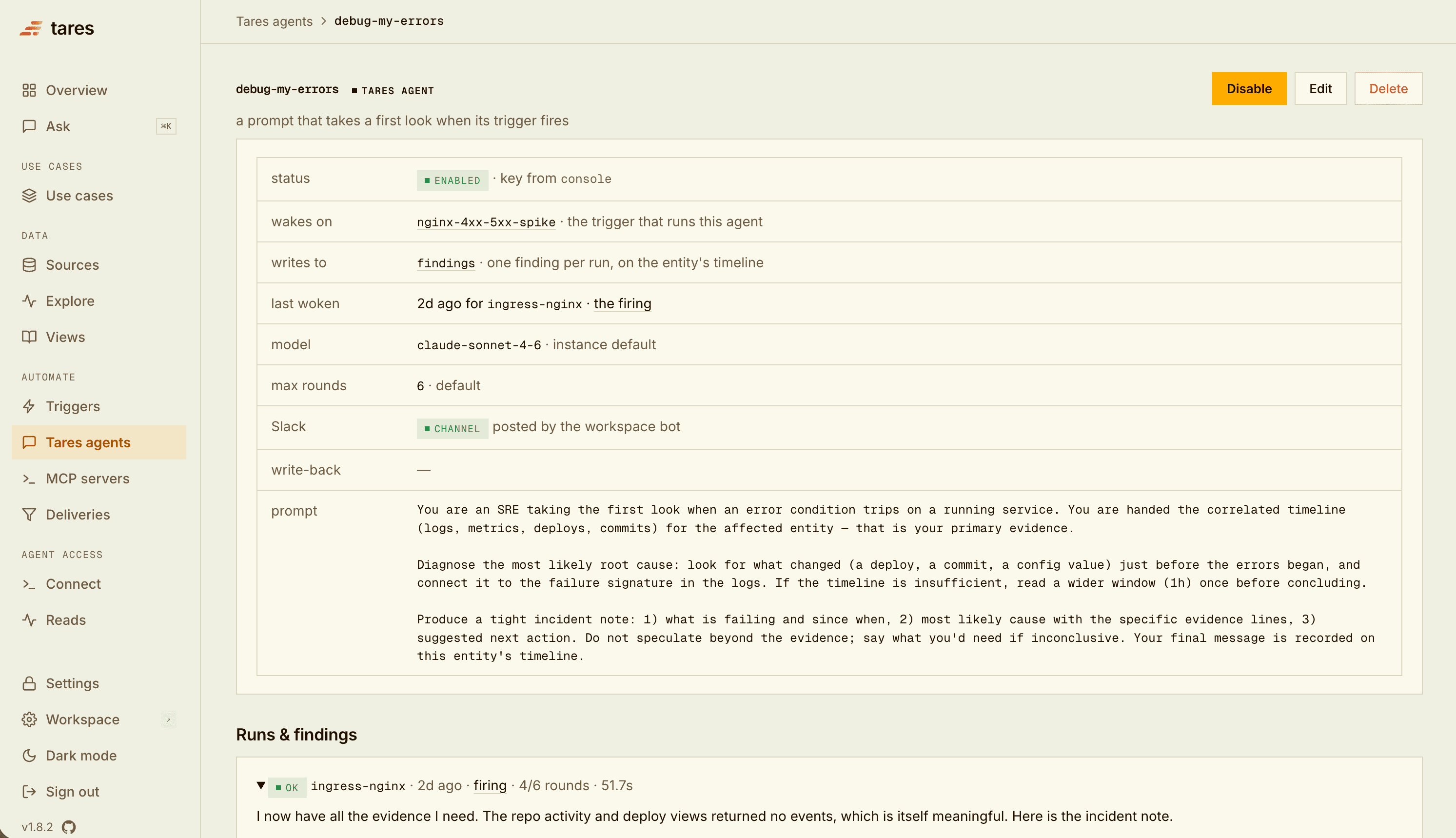
The Build an AI SRE guide walks this exact loop end to end.
Findings
An agent’s conclusion is written to the built-in findings source (auto-provisioned on the
first finding), keyed to the entity the trigger fired on. Because it’s treated as an event, it lands
on that entity’s timeline and is returned by read / query like everything else. Each finding
carries the agent, the trigger, the firing, and a hash of the prompt that produced it.
The Anthropic key
A Tares agent runs on Anthropic’s API. Provide a key one of two ways:
ANTHROPIC_API_KEYin the daemon’s environment, or- the console → Settings → Anthropic key.
The environment key wins if both are set. Without a key an agent can be created but not enabled; if it’s already enabled, each firing is logged as “no key” and no finding is written. The same key powers the in-app Ask assistant.
Tools and the boundary
By default a Tares agent has exactly two tools, both routed through the same Tares read path:
read: one correlated timeline for an entity across all sources.query: a timeline through a saved view.
That’s the default boundary: a Tares agent reads and concludes; it does not act (no restarting, deploying, or ticketing). Connecting external tools moves that boundary for that one agent: tools from an MCP server can act on whatever the server exposes, so you decide per agent which servers it may touch, and every run records what it actually called.
External tools (MCP)
An agent can use tools from external MCP servers alongside its built-in reads. Two steps:
- Register the server under MCP servers (in the sidebar, under Automate): a name, a streamable-HTTP URL, and an
optional auth header (the value is stored as a secret, never shown again; stdio servers are not
supported). The auth value can also point at a stored GitHub credential
(
credential:github/<name>, see Settings), so rotating the token in one place rotates the server too. Under Advanced: extra headers you can add non-secret headers sent with every request; GitHub’s hosted MCP server takesX-MCP-Toolsets: repos,pull_requeststo limit the tools it offers andX-MCP-Readonly: truefor a read-only agent. Test connects live and lists the server’s tools. - Opt the agent in on its form, under External tools: pick servers from the registry; each selection shows as a removable tag.
At run time, the selected servers’ tools are offered to the model alongside read and query,
prefixed by server name (github__create_issue). Guardrails:
- A tool result is capped at 8,000 characters, so a verbose server cannot crowd out the evidence.
- A server that is down when the run starts is skipped and logged; the run continues with the tools that remain, and a failed call is returned to the model as an error to reason about.
- Each run records the external tools it called, shown on the run under Runs & findings. That is the audit trail for what an agent touched outside Tares.
Runtime and guardrails
Only the prompt is yours to configure per agent; the runtime is fixed so a data-plane feature doesn’t become an agent builder. The numbers:
- Model: pick one per agent from the curated dropdown, or leave it on the default to follow
the instance (
TARES_AGENT_MODEL,claude-sonnet-4-6unless set). Catalog YAML accepts anyclaude-*id, so a model newer than the dropdown works without an upgrade. - Budget per run:
max_roundsmodel rounds (1 to 24; set under Advanced on the agent form or asmax_roundsin catalog YAML), 2,048 tokens per call. Unset, the default is 6, or 12 once the agent uses external MCP servers, since a run that reads a diff or a file and writes back needs more than the read-and-conclude budget. Every run records the cap it was held to and showsrounds/max. When the budget runs out mid-investigation the model gets one final call with tools disabled to conclude from what it has; if it still cannot, the run endsexhausted, keeps the last text as a partial note, and says to raise max rounds. - Cooldown: the agent runs at most once per the trigger’s cooldown per entity.
- Daily cap: at most 50 runs per agent per day (
TARES_AGENT_DAILY_CAP), so a trigger in a hot loop can’t run up an unbounded API bill. - No self-feeding: an agent can’t be woken by a trigger whose view includes the
findingssource it writes to; Tares rejects that wiring at definition time (it would fire itself forever).
Deliver findings elsewhere
Every finding lands on the entity’s timeline; the agent’s Deliver findings options also send it where people and systems already look. Each is a toggled row on the agent’s form:
- Slack channel: the workspace bot posts the full finding to a channel picked from the bot’s own membership list (connect the bot under Settings). The same bot serves trigger subscriptions, where deliveries are also retried and recorded in the delivery ledger.
- Write-back webhook: every finding is POSTed as JSON to your own automation, with an optional
bearer token sent as an
Authorizationheader. The body carries the finding and its run metadata, never a key or token:
{
  "event": "finding",
  "agent": "incident-first-look",
  "trigger": "incident",
  "key": "api-server",
  "finding": "…the incident note…",
  "run_id": "run_9f2c81d4a6b3",
  "dispatch_id": "c0f35f8210…",
  "model": "claude-sonnet-4-6",
  "rounds": 2,
  "tool_calls": 3,
  "started_at": "2026-08-14T12:01:03+00:00",
  "finished_at": "2026-08-14T12:01:35+00:00",
  "duration_s": 32.6,
  "prompt_hash": "1c9f2d"
}
Transient failures are retried; a delivery failing never loses the finding, which is already stored. Delivering a finding is not acting: the boundary stands.
- Slack incoming webhook: the older per-agent webhook URL still works but is neither retried nor logged, and is used only when no channel is set; prefer the channel.
Related
- Build an AI SRE: the full loop, end to end, on a demo system.
- Triggers: the condition that wakes an agent.
- Connecting agents (MCP): external agents that read on demand and can act.