Watch with triggers
A trigger watches one or more sources and evaluates a condition as events arrive. When it fires, Tares pushes to any subscribed webhook, so an agent is woken with the relevant timeline instead of polling. A trigger is used by one or more projects; each project says which agents it wakes there.
Have a source with a numeric field
Triggers aggregate a typed field, so at least one of the trigger’s sources must produce one. For
example, a Prometheus source emitting rate_5xx, labeled by service. See
Connectors → prometheus.
Define the trigger
A trigger names its sources, optional filters and key_field, a condition, what to emit,
and a cooldown. Add it on the project’s page (+ next to Triggers), under
Triggers → Add trigger, or in the catalog YAML:
triggers:
  - name: error_spike
    project: checkout watch   # optional; the Default project when left out
    sources: [checkout_metrics, checkout_logs]
    key_field: service        # optional; default: the first source's primary label
    filters:                  # optional; only these events count
      - { field: env, op: eq, value: prod }
    condition:
      aggregate: max          # count | sum | avg | max | min | any
      field: rate_5xx
      predicate: "> 1.0"      # fire when max(rate_5xx) over the window exceeds 1.0
      window: 1m
      group_by: [key_value]   # evaluated per entity (per service)
    emit:
      kind: error_spike
      context_window: 15m     # how much timeline to hand the agent
cooldown: 5m # minimum gap between firings for the same entitysourcesare the sources the trigger watches, at least one. They join the trigger’s project if they are not in it yet.key_fieldis the label that names the entity across those sources, such asservice. Each source should carry it.filtersnarrow which events count and which are handed over. Each is{field, op, value}withopone ofeq,neq,contains,gt,lt,gte,lte;fieldis a label the sources carry or one ofevent_type,source,text,key_value.
The condition is checked as events are ingested. group_by: [key_value] evaluates it per entity, so
each service fires independently.
To look at the sources on a clock instead of on a condition, give the trigger a schedule
(condition: {every: 10m}): it fires once per interval for all its events and hands over a summary
of the window. See Watch, then escalate.
Over MCP, an agent does the same with create_trigger and update_trigger, which take the same
fields (see Tools).
Subscribe an agent
A Tares agent is woken by the trigger in a project that wires it to that
trigger, once you turn it on there. An external
agent registers a webhook over MCP with the subscribe tool:
Use tares to subscribe to the
error_spiketrigger and deliver tohttps://my-agent.example.com/hook.
subscribe(trigger, url) returns a subscription id. (You can also register via POST /subscribe.)
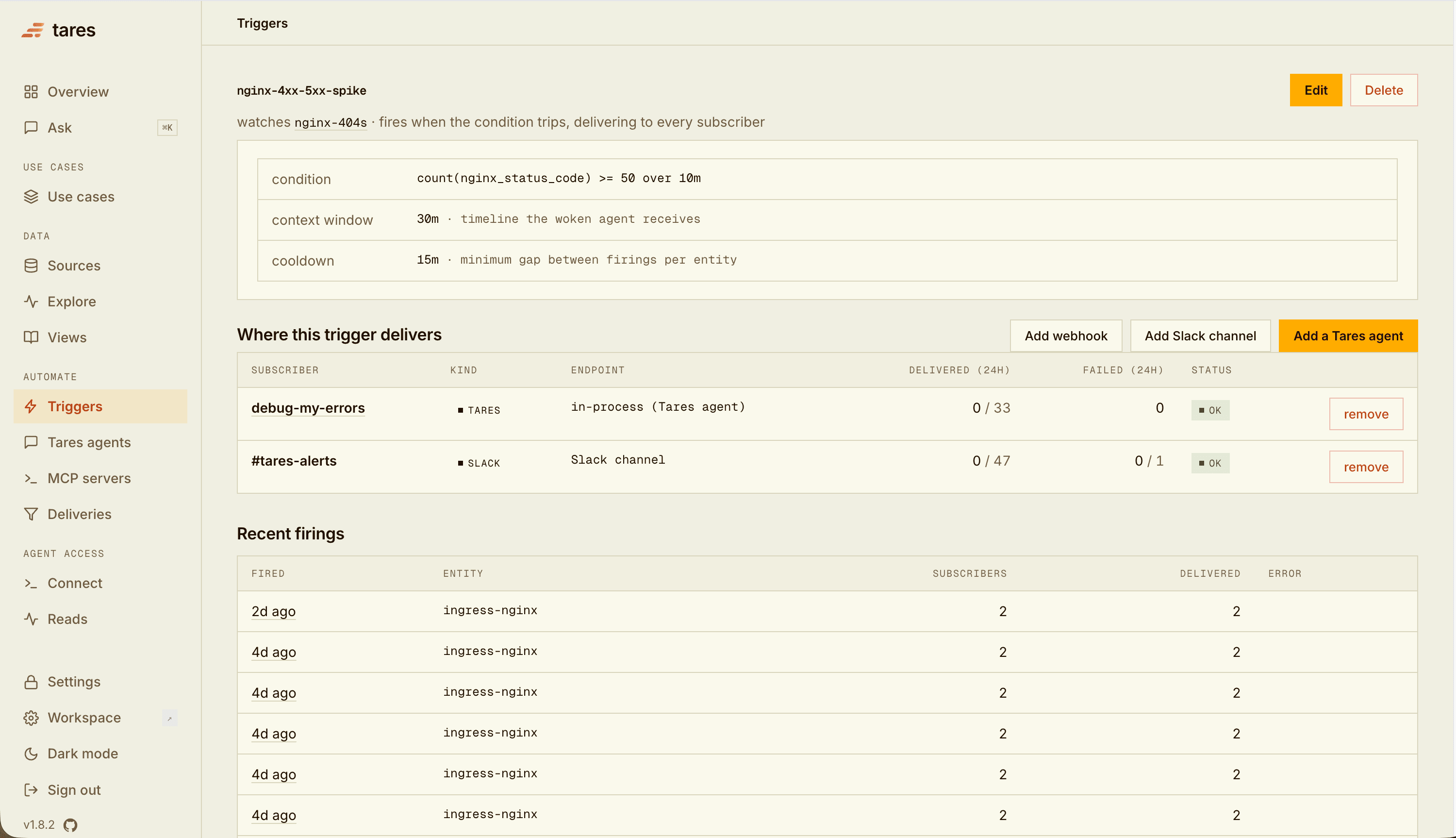
The trigger’s page shows everything it delivers to, with per-subscriber delivery counts:
Receive dispatches
When the condition holds, Tares POSTs one JSON body to each subscriber:
{
  "dispatch_id": "9f2c81d4…",
  "trigger": "error_spike",
  "project": "uc_1a2b3c",
  "projects": ["uc_1a2b3c"],
  "kind": "error_spike",
  "key": "api-server",
  "fired_at": "2026-07-17T09:14:03+00:00",
  "payload": "…the entity's correlated timeline, ready to hand to the model…",
  "run_ids": ["run_4be1c0d2a9f3"]
}
projects lists the running projects that use the trigger, and project is the first of them
(the one that made the trigger, when it is one). run_ids lists the Tares agent runs the same firing
started (empty when none). To receive every trigger of a project at once, an outside agent can
join the project.
payload is the entity’s correlated timeline across the trigger’s sources over
context_window: the deploy, the logs, the metrics around the spike, so the agent has context
without making a follow-up call. Your endpoint can be anything that accepts a POST and starts your
agent with the body as context: a small FastAPI/Express route, a serverless function, a
workflow-engine webhook. It must be reachable from the Tares server.
Delivery rules:
- At-least-once. A firing can be delivered more than once; dedupe on
dispatch_id. - Acknowledge with a 2xx. 5xx responses and transport errors are retried with backoff; a 4xx is recorded as a failed delivery and not retried.
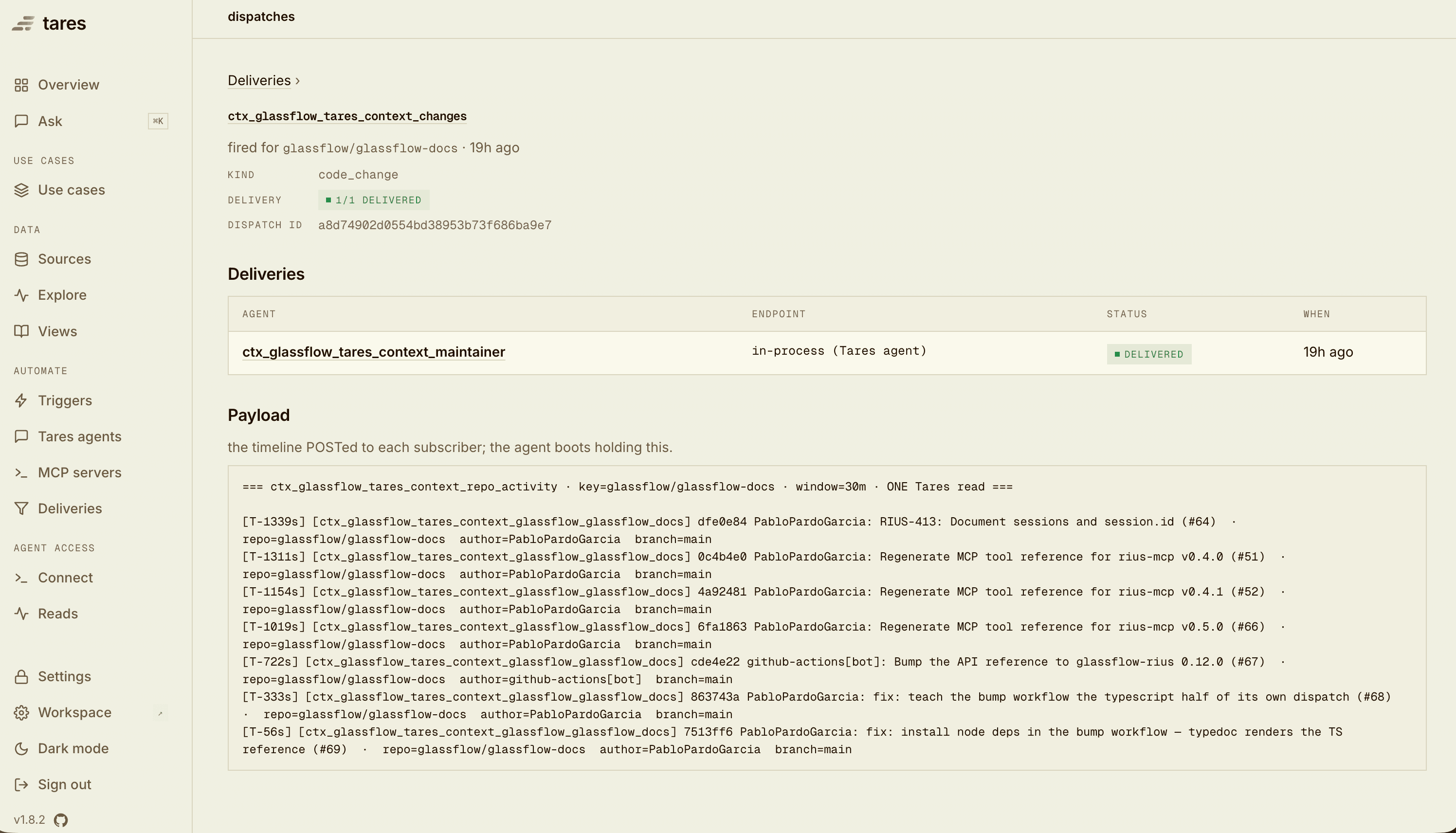
- Every firing is logged, even with zero subscribers. Firings and per-subscriber delivery status are in the console under Firings, on the trigger’s own page, and on the project’s Activity. Each dispatch has its own page with the delivery outcomes and the exact payload that was sent:
cooldown prevents a flapping condition from firing repeatedly for the same entity. Pick different
aggregates/fields for different incident shapes, e.g. max(p99_ms) > 1000 for latency vs
max(rate_5xx) > 1.0 for an error storm.
Upgrading from a version with views? Each trigger took its view’s sources, filters and key field on
the first start. The API refuses a trigger that names a view with “views were removed: give the
trigger sources (and filters)”. A catalog file exported with a views: section still imports:
each trigger gets its view’s sources, filters and key field. See
Upgrading from views.