Track Claude Code usage and cost across a team
Install the rius-coding-agents plugin in Claude Code, sign in to a shared
Rius workspace, and turn tracing on for the repos you want to watch. Every
session then streams to Rius as an OpenTelemetry trace with its model
calls, tokens, cost, tool calls, and subagents, per developer and per
session. Prompts and replies are sent only from folders where a developer
turns content on. The same plugin covers Codex and Cursor in beta, and OpenHands
sends to the same workspace over OpenTelemetry.
Set it up for your team
Pick one workspace for the team
Use one Rius workspace for everyone’s coding sessions, so cost and usage add up in one place. A workspace admin invites your teammates under Settings → Organization. Teammates accept the invitation first, then pick the team workspace when they sign in below.
Each developer installs the plugin
In a terminal:
claude plugin marketplace add glassflow/rius-coding-agents && claude plugin install rius@rius-coding-agentsThe plugin needs Python 3.9 or later; see Requirements. To install from inside Claude Code instead, see Install.
Each developer signs in
/rius:loginIn the browser, sign in, pick the team workspace, and click Connect. The plugin stores a key for that machine and workspace.
Each developer turns tracing on for a repo
In each repo you want traced:
/rius:enable-hereTracing is opt-in per developer and per folder. You can’t turn it on for
the team from a repo’s settings, and Claude can’t turn it on itself: each
developer runs the command. /rius:status confirms the state: the first line reads
Rius tracing: on.
Start Claude Code from inside the repo you enabled, not from a parent folder. A session started elsewhere can stop being traced partway through.
What each session records
One Claude Code session is one trace. Its spans fill in while the session runs:
- The session, as the root of the trace.
- Each turn: one prompt and everything it caused.
- Each model call, with the model, input and output tokens, cache reads and writes, and cost.
- Each tool call: Bash, Read, Edit, MCP tools, and so on, with errors marked on the span.
- Each subagent, nested under the call that started it, with its own model calls, tokens, and cost.
A folder enabled with /rius:enable-here sends structure only: the span
tree, models, tokens, cost, timing, tool names, and error types, plus the
developer’s email (as user.id), the folder path (which can include the
local user name), and the git branch. It sends no prompts, replies, file
contents, or command output. To also send prompts, replies, file contents,
and command output, enable the folder with /rius:enable-content-here
instead. The plugin removes the secrets it recognizes first, on a
best-effort basis.
Everyone in the workspace can read what is sent, so agree as a team which
repos send content. What gets captured
has the full list.
Rius prices tokens at API rates. On a Claude Pro or Max subscription, the cost in Rius measures usage; it isn’t what you pay.
See usage and cost per developer
With plugin 0.6.2 or later, each session is recorded under the email the
developer signed in with, as user.id. In the console:
- The Users page lists each developer, with their Traces (one per session), Failed traces, and Cost for the selected time window (7 days by default). Sort by Cost to see who drives spend, and open a developer to see their recent and failed sessions.
- The trace list shows one row per session. The Sent by column names the owner of the key that sent it; click it to filter to one developer.
- The Agents page shows Claude Code as an agent
named
claude-code, with its traces, errors, and cost for the window, and each open session as a live instance.
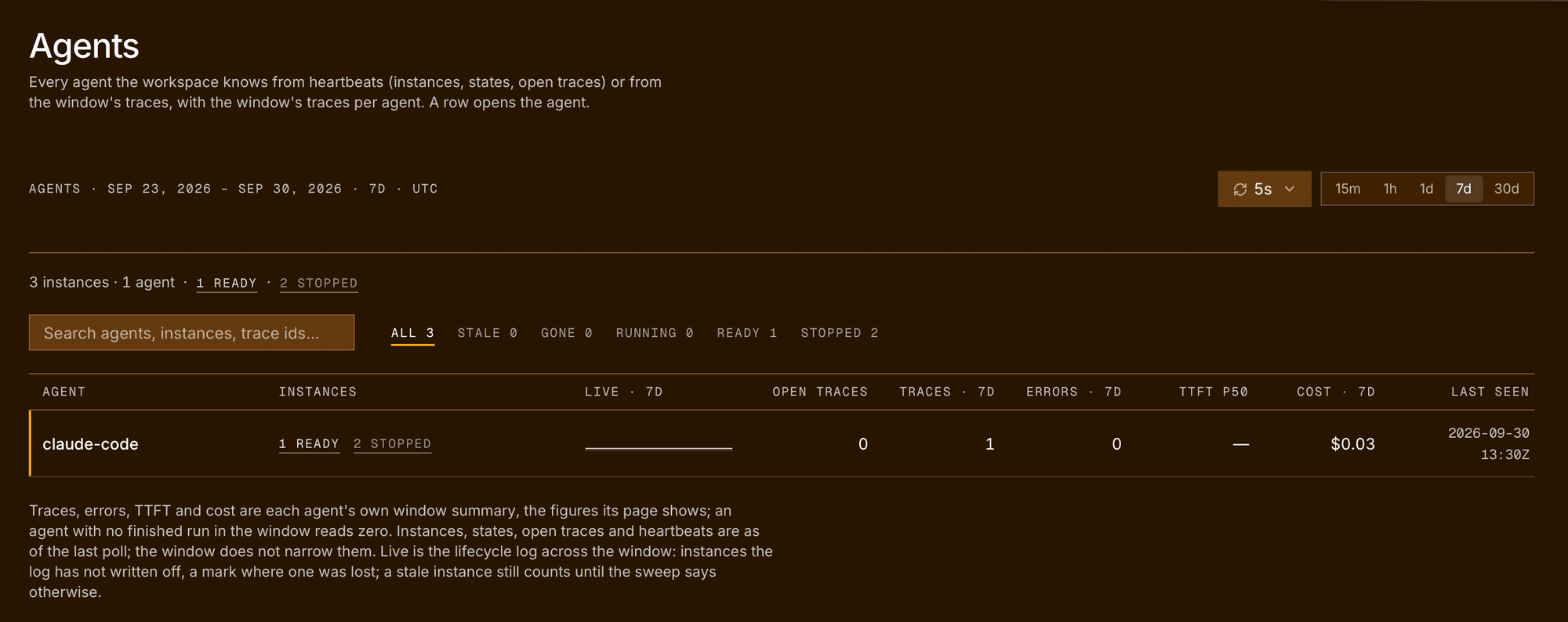
The Users and Agents figures count a session once it has ended. The trace list shows it while it runs. A session that never ends cleanly, because Claude Code crashed or was killed, is never counted there.
Sessions from older plugin versions, and sessions sent with an
existing API key
instead of /rius:login, carry no developer and land in the anonymous
row on Users.
See what one session is doing
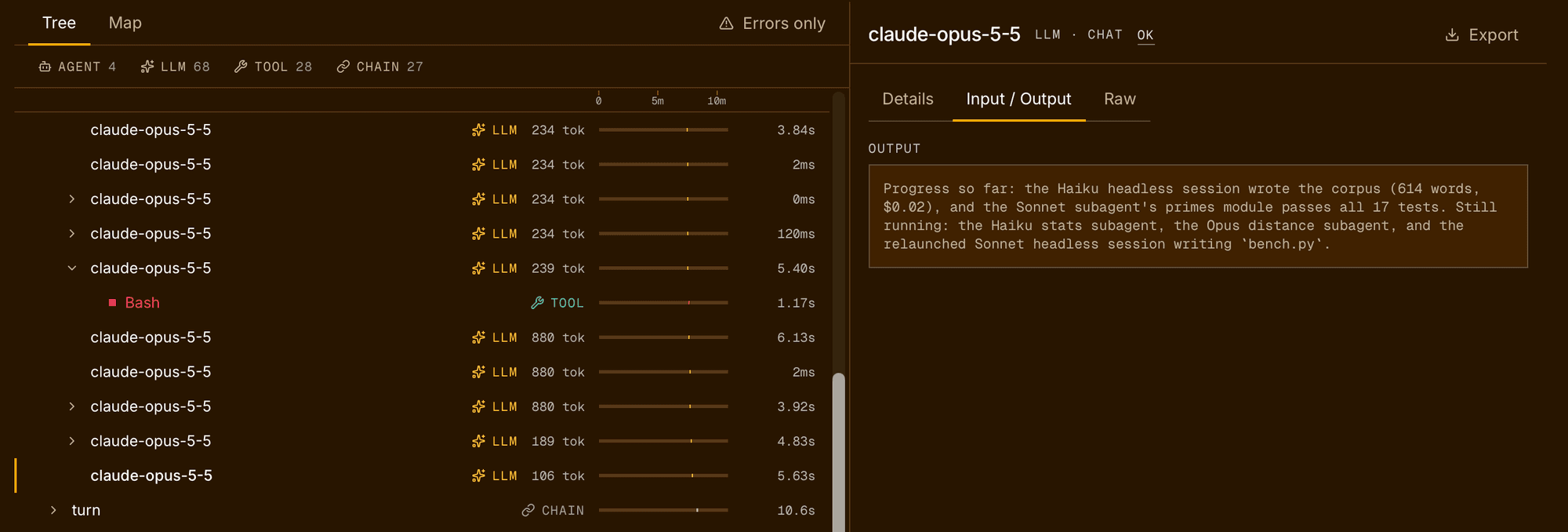
Open the session in the trace list. The waterfall shows every turn, model call, tool call, and subagent in order, with tokens and cost on each model call. A failed tool call is marked as an error, so you can go from “this session cost $12” or “this session went wrong” to the exact step.
You can also ask from the terminal. The plugin brings the
Rius MCP server. Run /mcp, pick rius, and sign in with
your Rius account once. Then ask Claude
questions like:
- “Which Claude Code sessions in the last 7 days cost the most, and what did the tokens go on?”
- “Show me my last failed session and which tool call went wrong.”
- “How much did subagents cost this week compared with the main sessions?”
See Query your sessions.
Codex (beta)
The same plugin traces the Codex CLI: one trace per session, with model
calls and their tokens, tool calls, and subagents, under an agent named
codex. It installs with:
codex plugin marketplace add glassflow/rius-coding-agents && codex plugin add rius@rius-coding-agentsCodex keeps its own sign-in and folder rules. See Codex (beta).
Cursor (beta)
The same plugin traces Cursor agent chats, in the editor and in
cursor-agent: one trace per chat, with tool calls and subagents. Cursor
doesn’t give plugins token counts, so Cursor traces show no tokens and no
cost. See Cursor (beta).
OpenHands
OpenHands needs no plugin. Its SDK already traces every conversation with
OpenTelemetry, so three environment variables send each conversation to
Rius as one trace, with model calls, tokens, cost, and tool calls. To see
each developer on the Users page, pass user_id when you create the
conversation; see
Attribute conversations to a user.
Related
- Claude Code plugin: the full guide, including what gets captured, signing out, and troubleshooting.
- Users: the per-user view of traces, failures, and cost.
- Settings: workspaces, members, and API keys.