Amnesia (skipped tools)
An agent can quietly stop using a tool it normally relies on. It keeps running and keeps answering, but without the search, the lookup, or the check that made its answers good. Nothing errors, so nothing tells you. Amnesia is the pre-defined alert that finds these runs: it learns which tools each of your agents usually calls, and raises a finding when a finished session skips or loses one of them.
Its findings are filed under the failure mode id CF-16. See
Failure modes.
Every workspace with alerting has an Amnesia alert, enabled by default. Like the other pre-defined alerts, you tune its thresholds on its details page and attach channels to it.
What it finds
Amnesia compares each finished session with what the same agent did in its own earlier sessions. It reports two rules.
| Rule | Fires when | Severity |
|---|---|---|
| A: offered but never called | The tool was in the agent’s tool list on the session’s LLM calls, and the session never called it | Warning. Critical when the agent uses the tool in at least 95% of its sessions |
| B: missing from the tool list | The agent usually has the tool, this session’s tool list did not include it, and a later session has it again | Warning |
A third result, the toolset change, is information only. See A removed tool is not a finding.
Rule A: offered but never called
Fires when the model could have called a tool and never did, in a session
where the agent normally does. For example, a support agent calls
search_docs in 92% of its sessions. One session offers search_docs on
every call and never uses it, so the agent answered from memory.
The finding names the tool and gives the numbers behind it: how many LLM calls offered the tool, and the share of sessions that use it. For example:
`search_docs` was offered on 6 LLM calls but never called; this agent uses it in 92% of 41 sessions over the last 7 daysRule B: missing from the tool list
Fires when a tool the agent usually has was not in the session’s tool list at all, and it shows up again in a later session. The usual cause is a race: the tool comes from something that connects at startup, such as an MCP server, and the session began before that connection finished. The agent cannot call a tool it was never given, so the session ran worse for a reason the agent had no say in.
Because the tool comes back, Amnesia treats the gap as a race and raises a warning. It looks up to 24 hours past the end of the session for a later session that offers the tool again.
A removed tool is not a finding
If a tool is missing from a session and also missing from the next sessions of the same agent, you most likely removed it on purpose. Amnesia does not alert on that. Instead it records an info result on the first session without the tool, such as:
`search_docs` was removed from this agent's toolset since 2026-11-10T14:03:00ZIt needs the next four sessions with tool lists to lack the tool too, and those sessions must close within a day of the first one. The info result appears on the run, never alerts anyone, and is not counted as a silent failure. If the tool does come back, the result is the rule B warning instead.
What it ignores
Amnesia stays quiet when it cannot judge fairly:
- Short or errored sessions. A session needs at least two LLM calls, since a one-call session has no room to use a tool. A session whose root run ended in error is skipped too, because it may have stopped early.
- New tools. A tool added to an agent’s list in the last 48 hours is not judged, so the agent has time to pick it up.
- Agents with too few sessions. Until an agent has 20 sessions in the baseline, none of its sessions are judged.
- Tools the agent rarely uses. The usage threshold cannot go below 50%, so a tool the agent calls about as often as not is never a finding.
- Sessions without tool lists. A session whose LLM calls carry no tool definitions is unknown, not judged, and does not count as a removal.
The baseline is the agent’s own sessions over the last 7 days, and the session being judged is left out of it. Two agents never share a baseline, so a tool that one agent uses all the time does not make another agent look wrong.
Findings are built from finished sessions: Amnesia judges sessions that closed within the time window, 60 minutes by default. One agent produces at most 20 findings for each of the two rules per check, with the strongest first, so a broken toolset does not raise one finding per tool.
A new workspace, or one that has only just started sending tool definitions, waits before the first finding. The baseline needs 7 days of history by default and at least 20 sessions per agent. Expect no Amnesia findings during the first week, even if an agent is already skipping tools.
Read a finding
Findings from Amnesia appear on the Alerts page like the other detectors, one firing per agent and tool. Open one to see:
- The tool and the agent it concerns.
- How many runs were affected and when you first and last saw it.
- The reason line for the newest run, with the usage share and the number of sessions it was measured on.
Open a run to see the session itself. To judge a finding, compare it with the Tool usage panel of the same agent: it shows how often the agent uses the tool and lists recent sessions that skipped it.
See tool usage per agent
The page of each agent has a Tool usage panel. For every tool the agent was offered over the last 7 days it shows:
- The usage rate, such as “39 of 41 sessions, 95%”.
- When the tool was last offered.
- Up to five sessions that were offered the tool and skipped it. Each links to the agent’s traces filtered to that session.
Tools the agent never called sit last, muted and labelled “never used”. The panel always covers 7 days, whatever time window the page uses. If the agent sent no tool definitions in those 7 days, it says so and stays empty.
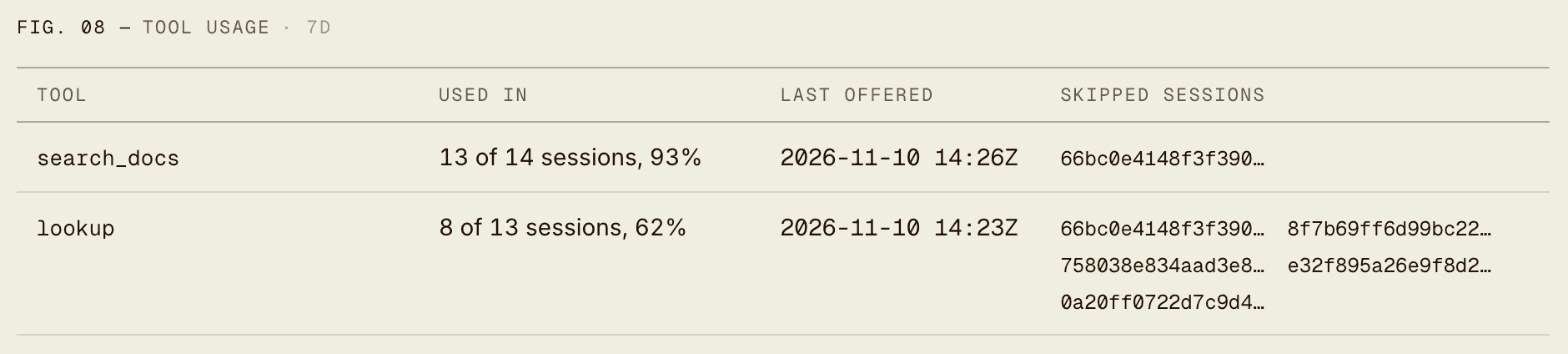
Use it to check a finding before you act on it, and to spot tools your agent never uses even though you offer them on every call, which cost tokens and add noise to the model’s choices.
Tune or turn off Amnesia
Open the Amnesia alert from the Alerts page to change its knobs.
| Knob | Default | Meaning |
|---|---|---|
| Tool usage | 80% | Share of the agent’s sessions that must use a tool for it to count as one the agent relies on. From 50% to 100% |
| Critical usage | 95% | Usage at which skipping the tool is critical. At least the tool usage |
| Baseline sessions | 20 | Sessions the agent needs in the baseline before any of its sessions is judged. From 5 to 1000 |
| Baseline | 7 days | How far back the agent’s own sessions set what it usually does. From 1 to 30 days |
| Time window | 60 minutes | How far back closed sessions are judged. From 5 minutes to 24 hours |
Raise Tool usage if you see findings for tools the agent uses only most of the time. Lower Baseline sessions for agents that run rarely, and raise it to wait for a firmer picture. A longer Baseline smooths out agents with a weekly rhythm but delays the first findings.
To turn Amnesia off, disable the alert on its details page. Disabling it stops evaluation, so it raises no new findings; its open firings stay as they are until you enable it again. You cannot delete a pre-defined alert.
What to send
Amnesia can only judge what your agents report. A quiet alert can mean healthy agents or missing inputs, so compare this list with what your spans carry.
| Amnesia needs | Which means |
|---|---|
| Tool definitions on LLM spans | The list of tools each LLM call was given, as gen_ai.tool.definitions. The Rius SDKs send it while content capture is on |
| Tool call spans | A span with a tool name for each call the agent makes, so Amnesia can tell which tools were used |
| An agent name | gen_ai.agent.name on the agent spans, so the baseline is per agent |
| A session id | Optional. Without one, each trace counts as its own session |
Tool definitions are content, so they follow your privacy settings. With
capture_content=False
the SDKs do not send them and Amnesia has nothing to compare. Tool names on
tool call spans still flow.
If an agent sets no name, Rius falls back to the service name and puts every agent of that service into one baseline. A tool that one of them uses would then look expected for all of them. Set the agent name so each agent is measured against itself. The console does not flag a missing agent name on its own, so check it yourself.
The console tells you when Amnesia cannot run. In the detector coverage for the workspace, Amnesia shows one of these reasons while it is not ready:
| Reason | What to do |
|---|---|
| No LLM spans carry tool definitions | Turn on content capture in the SDK so tool definitions are sent |
| Tool definitions are present but no tool spans were seen | Check that your tool calls are traced |
Use it from your coding agent
The Rius MCP server has a tool for the same data as the Tool
usage panel, list_agent_tool_usage. Ask your coding agent which tools an
agent skips, or call it with the agent name and the workspace id from
list_workspaces:
| Argument | Type | Default | Description |
|---|---|---|---|
workspaceID | string | required | The workspace id, from list_workspaces. |
agentName | string | required | The exact agent name, from list_agents. |
hours | integer | 168 | How far back to look, from 1 to 720. |
Which tools does checkout-agent skip?
{
    "name": "list_agent_tool_usage",
    "arguments": { "workspaceID": "<workspace id>", "agentName": "checkout-agent" }
}
It returns the number of sessions with tool definitions, and for each tool:
| Field | Meaning |
|---|---|
tool, display_name | The tool’s name |
sessions_offered, sessions_called | Sessions that were offered the tool, and sessions that called it |
usage_pct | sessions_called as a share of sessions_offered, to one decimal |
never_used | true when no session called the tool |
first_offered_at, last_offered_at | When the tool was first and last in a tool list |
skipped_session_ids | Up to five of the newest sessions that were offered the tool and skipped it |
Used tools come first, highest usage first. Tools never used come last. An agent with no tool definitions in the period returns an empty list. Example sessions are looked up for the first 30 tools that have a skipping session, so later tools show an empty list.
To find the findings themselves, use list_silent_failures with
failure_mode set to CF-16. See the tool reference.
Next steps
- Pre-defined alerts: the other detectors and how knobs and channels work.
- Context rot: the detector for full, compacted, and truncated contexts.
- Distribution channels: route findings to webhook, email, or Slack.
- Privacy controls: decide what content leaves your process.